BC-250 GPU Manager
Changes the board
The app edits the governor's settings file, /etc/cyan-skillfish-governor-smu/config.toml, or the tt governor's. Before each change from its pages it makes a dated backup of the file beside it. It starts, stops, enables and disables the governor's service. It sends the governor clock, voltage and range requests over D-Bus. The governor is what sets the GPU's clocks and voltages. The app never writes a register itself. For each attempt, the GPU sweep puts a test clock and voltage in the settings file and restarts the governor. It puts your own file back after each attempt, on a temperature abort and when it stops. A freeze can leave the test settings in the file. The sweep then puts your own file back first, at its next attempt. Install in the sweep makes a dated backup, writes the best step into the file and restarts the governor. The settings file stays across reboots and power offs. The governor reads it whenever it starts. What the app sets over D-Bus, test mode included, lasts until the governor restarts. Nothing is written to the BIOS, the firmware, the CMOS or the kernel's arguments. Restore selected on the Backups page makes any earlier settings file the current one again. Stop test ends a test, and Stop ends an attempt of the sweep. Removing the app leaves the settings file and its backups as they are.
BC-250 GPU Manager lets you set up and watch the GPU of an AMD BC-250 board running Bazzite. It is a PyQt6
window for cyan-skillfish-governor-smu, the GPU governor. A governor is the service that sets the GPU's clocks
and voltages. The board's APU is the Cyan Skillfish (gfx1013). Bazzite is a Fedora Atomic system that updates with
rpm-ostree.
You need the governor installed first. It comes from the COPR filippor/bazzite. Its source is
filippor/cyan-skillfish-governor, smu branch.
sudo rpm-ostree install cyan-skillfish-governor-smu
systemctl reboot

# view configuration
sudo nano /etc/cyan-skillfish-governor-smu/config.toml
What it manages
- The
[gpu-usage]section of/etc/cyan-skillfish-governor-smu/config.toml:
| Key | Default | Meaning |
|---|---|---|
fix-metrics |
true |
Patch the GPU usage in gpu_metrics and bind-mount it over sysfs. This fixes the 655% bug of MangoHud, the Steam overlay and radeontop. |
fix-freq |
false |
Also patch current_gfxclk_frequency with the real SMU clock. This fixes the wrong sysfs frequency, mainly after the 8-core unlock. |
method |
busy-flag |
How the governor samples the load: busy-flag, process or kernel. kernel needs a patched kernel. |
temp-read |
drm |
Where the governor reads the GPU temperature: DRM ioctl or hwmon sysfs |
flush-every |
10 |
Flush the patched table every N update cycles |
- The
[gpu]section withset-method:smu, the default, sets clock and voltage through the SMU directlykernelgoes through the amdgpu sysfs interface
- These sections, with the presets Shipped defaults, Quiet, Responsive and Maximum clock:
[frequency-range]withmin/maxin MHz, where 0 = no limit[load-target]with theupper/lowerramp thresholds[temperature]withthrottlingand the optionalthrottling_recovery[dbus]withenabled
-
The control loop:
[timing.intervals]withsample/adjustin µs[timing.ramp-rates]withnormal/burstin MHz/ms[timing]withburst-samplesanddown-events. Forburst-samples, 0 or Off leaves the key out.[frequency-thresholds]withadjust, the dead band in MHz
The app checks these values the way the governor does:
adjust ≥ sample,burst > normalandburst-samples1–64.The app writes only known keys. Every other line of the file stays as it is, including comments. The app appends missing keys to their section and creates missing sections. Before each write it makes a copy
config.toml.bak-YYYYMMDD-HHMMSSnext to the file. * The governor's D-Bus interfacecom.cyanskillfish.Governor, on the system bus throughbusctl. It offers these: * performance mode on/off * a fixed frequency * a runtime min/max range * a runtime load target and temperature thresholds * the current, initial and allowed rangesIt needs
[dbus] enabled = truein the config. The shipped file has it. The root-onlyTestModeinterface (SetTestMode, viapkexec) pins a frequency and voltage. That way you can try a safe point under load before it goes into the file. *cyan-skillfish-governor-smu.service: start, stop, restart, enable, disable,systemctl statusand a live journal tail with a filter. * The Overview shows these: * the service state * whether the patchedgpu_metricstable is mounted * GPU load, clock, temperature and socket power * a GPU load chart * the decodedgpu_metricsv2.x tableThe table holds activities, temperatures, power, clocks, the throttle status and the CPU core clocks.
The BC-250 usually has no gpu_busy_percent sensor. The governor measures the load itself. With fix-metrics on,
it publishes the load as average_gfx_activity in the patched gpu_metrics table. It bind-mounts that table over
sysfs. The app reads the load from there. When that fails, it falls back to gpu_busy_percent. After that it
falls back to radeontop if installed: rpm-ostree install radeontop.
When no source is usable it shows N/A, never a misleading 0%. The tooltip then says what to do about it:
- install the governor
- turn on
fix-metrics - start the service
Privilege model
The app runs as your normal desktop user. Only three things need root. Each goes through pkexec, with one prompt:
- the backup plus write of
config.toml, in a single call - the
systemctlactions - the safe-point test, with
busctlon the governor's root-only TestMode interface
The desktop's polkit agent handles the password. The app never sees it.
The GPU sweep is the exception. Its script uses sudo for the governor's config, the service and
the kernel log. The sweep window asks for the password in a masked field and passes it to sudo. It never stores it.
Requirements
Python 3.11+
PyQt6>=6.11,<7
PyQt6-Charts>=6.11,<7
The PyQt6 wheels bundle Qt. Nothing is layered with rpm-ostree.
The GPU sweep also needs these:
- memtest_vulkan in
~/.local/bin, strongly recommended. It checks its results, so it finds wrong results and not only crashes. Without it, the sweep uses vkpeak, vkmark or glmark2. sudo, for the governor's config, its service and the kernel log
Install on Bazzite
Install it from the BC250 Bazzite Suite portal. Or download bc250-gpu-v<version>.tar.gz from the suite's
releases, unpack it and run the installer:
tar -xzf bc250-gpu-v*.tar.gz
cd bc250-gpu-v*/
./install.sh
It installs the app for your user only. It needs no root and layers nothing with rpm-ostree. It installs these:
- a private venv with PyQt6 and the app under
~/.local/share/bc250-governor-manager - the launcher
~/.local/bin/bc250-governor-manager - a desktop entry and the icon
- a Desktop icon, which
./install.sh --no-desktop-shortcutleaves out
BC-250 GPU Manager then appears in the application menu. If you want it in Steam's Game Mode too, add it there with Add a Non-Steam Game.
- To update, run
./install.shagain from a newer release. - To remove the app, run
./install.sh --uninstall. - To also remove its settings, profiles and start-at-login entry, run
./install.sh --uninstall --purge.
The installer never touches the governor's config.toml and its backups.
Run from the repository
git clone https://github.com/RobertoTorino/bc250-bazzite.git
cd bc250-bazzite/apps/gpu
python3 -m venv python && python/bin/pip install -r requirements.txt && python/bin/python -m gpu_governor
The app takes these options:
python -m gpu_governor --config PATHpoints the app at anotherconfig.toml. Use it for development on a machine without the governor.--start-in-traystarts the app hidden in the system tray. The login autostart entry uses it.--profile NAMEapplies a saved profile. When the app already runs, the running instance applies it. Otherwise, the app starts and applies it. That makes it the command to bind to a desktop keyboard shortcut. Copy hotkey command on the Tuning page puts the exact line on the clipboard.--list-profilesprints the saved names.--versionprints the version.
The app runs once per user, over a local socket. A plain second launch raises the window.
The older tt governor
--backend tt manages cyan-skillfish-governor-tt instead. It comes from the tt branch of the same project.
Its unit is cyan-skillfish-governor-tt.service, and its config is /etc/cyan-skillfish-governor-tt/config.toml.
The default --backend auto picks whichever unit systemd has loaded. When neither is loaded, it picks smu.
The tt governor lacks these:
- the
[gpu-usage]fix - the
[gpu]set-method [frequency-range]timing.down-events- D-Bus
- GitHub releases
So with it the app hides these:
- the GPU Usage and Performance pages
- those Tuning sections and fields
- the gpu_metrics/performance status
- the update check
The GPU load sensor stays unavailable with it. Load target, temperature, timing, frequency thresholds, safe points, backups and the service page work the same.
Pages
🔽 1 - Overview page
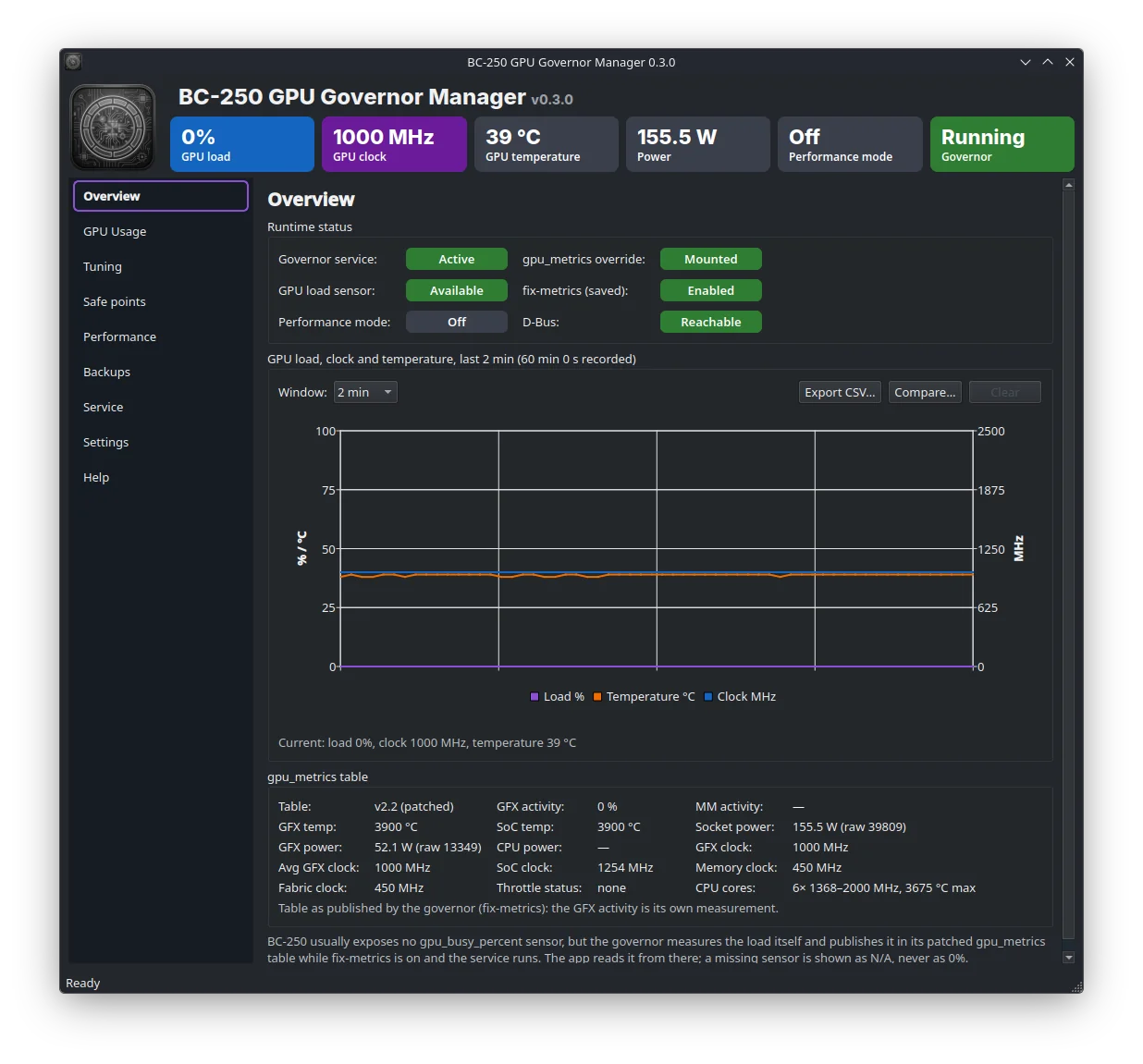
- Overview shows these:
- runtime status pills
- a chart of GPU load, temperature and clock, with a 2/10/30/60-minute window over the last hour of samples
- Export CSV… for the whole history
- Compare… to overlay an earlier export dashed, with both sessions' averages/peaks
- the
gpu_metricstable
🔽 2 - GPU Usage
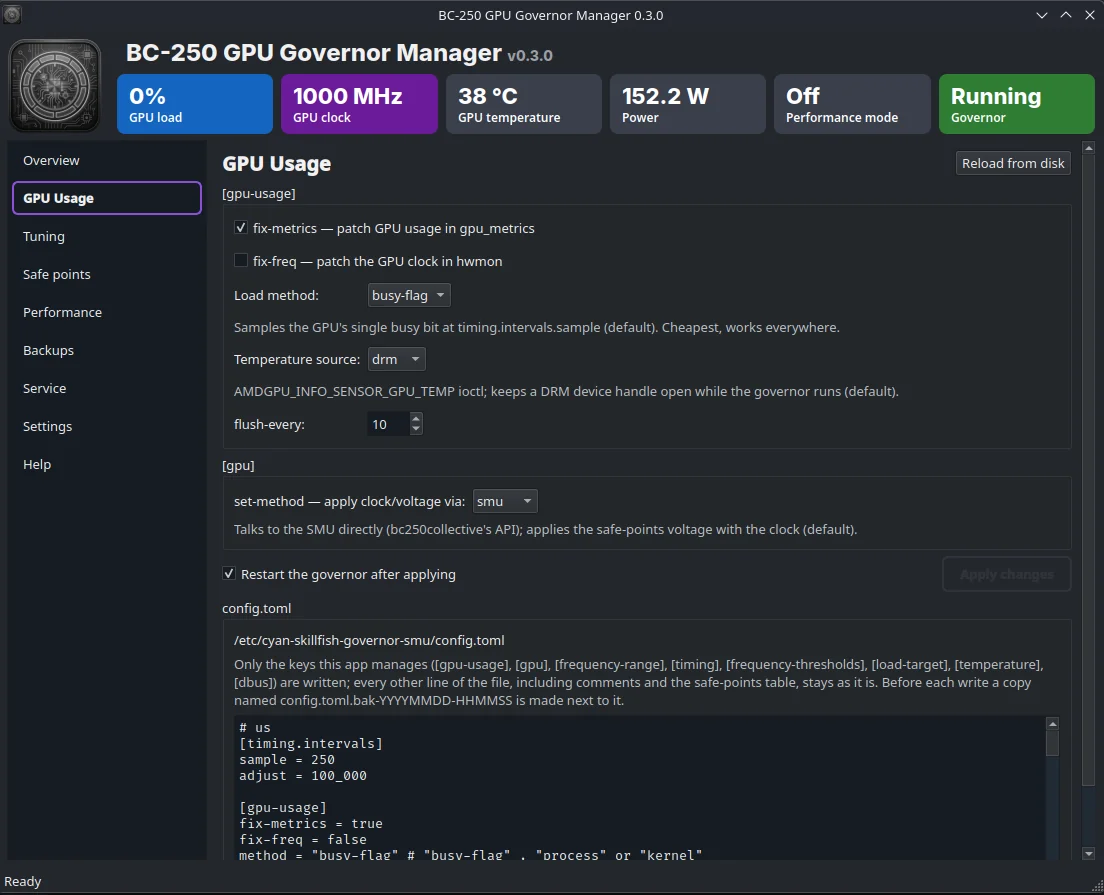
- 2 - GPU Usage edits
[gpu-usage]and[gpu]. Apply changes turns on as soon as a value differs from the file. The window title then gets a*. The governor reads the file at start only. So the app restarts it after applying, unless you uncheck Restart the governor after applying. Reload from disk discards the edits. The raw file shows below.
🔽 3 - Tuning
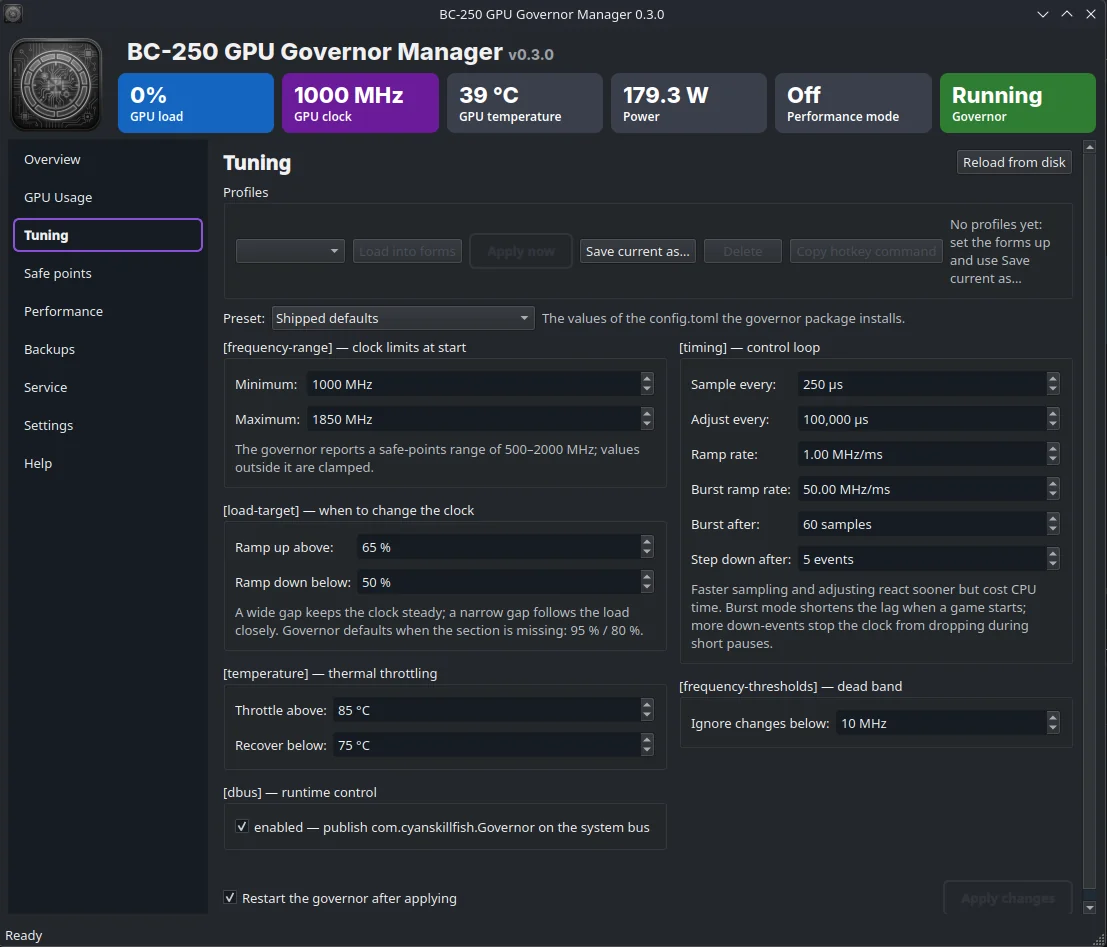
-
3 - Tuning has the frequency range, load target, temperature and D-Bus sections on the left. They come with presets and checks. On the right are the
[timing]control loop and the[frequency-thresholds]dead band. The control loop covers sample/adjust intervals, ramp rates, burst mode and down-events. Apply on either config page writes the pending edits of both.Named profiles are snapshots of the Tuning and GPU Usage values. The app keeps them for each user in
~/.config/bc250-governor-manager/profiles.json. You can save a profile, load it into the forms, apply it directly or delete it. Safe points are not part of a profile. Copy hotkey command gives the--profilecommand line to bind to a desktop shortcut.
🔽 4 - Safe points
-
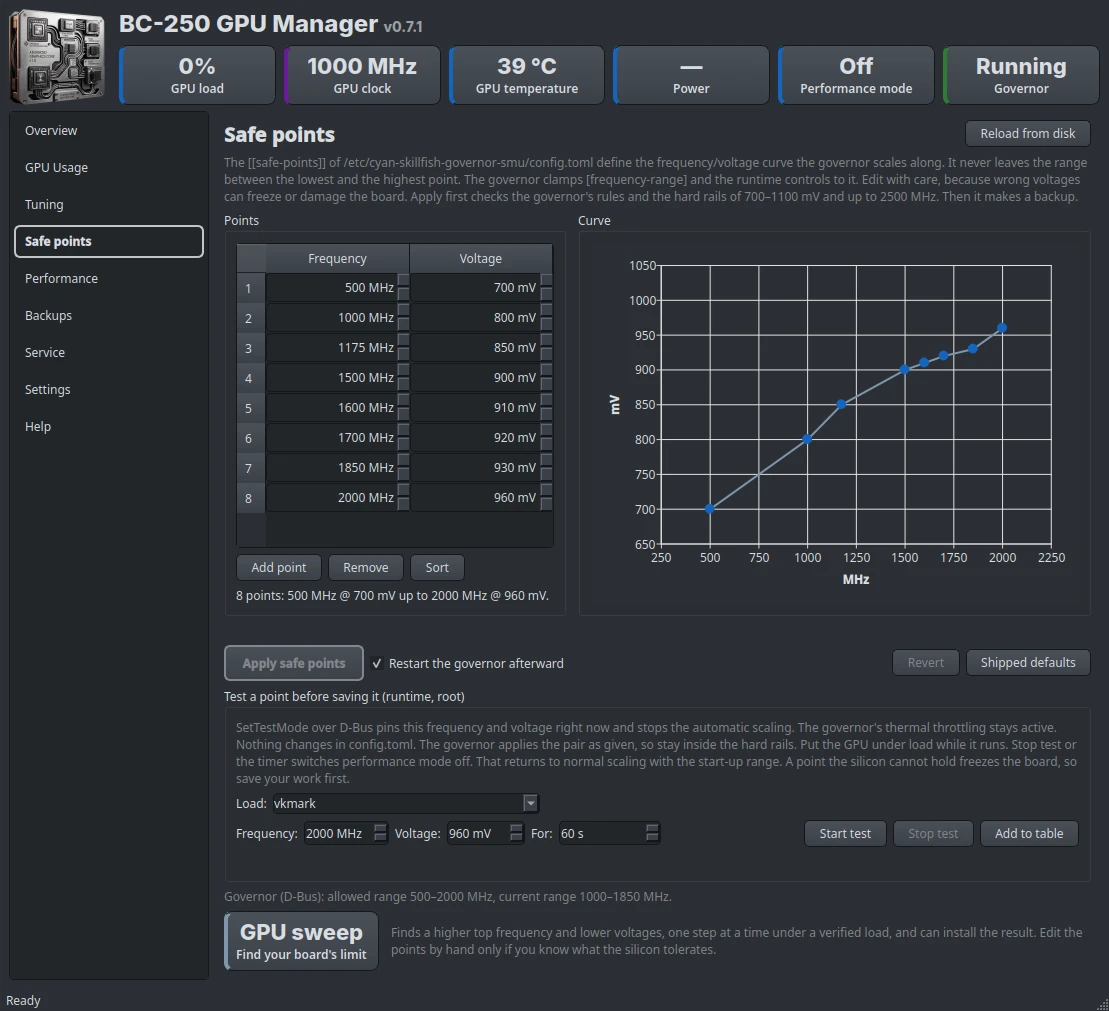
4 - Safe points shows the
[[safe-points]]frequency/voltage curve as an editable table and chart. You can add and remove points, load the shipped defaults and revert. Apply works only after two checks pass:- the governor's rules: unique frequencies and a voltage that never drops as the frequency rises
- the hard rails of 700–1100 mV and ≤ 2500 MHz
You get warnings above 2000 MHz / 1000 mV. Apply makes a backup and asks for your password.
Test a point before saving it pins frequency and voltage over the root-only TestMode D-Bus interface. It asks for your password through pkexec. Thermal throttling stays on, and nothing goes into the file. The test has these:
- fields filled in from the selected row
- a timer, 60 s by default
- an optional load generator from PATH, one of vkmark, glmark2, vkcube or glxgears
- a kernel-log watch (
journalctl -k -f) - a result line
- Add to table, to turn a held point into a safe point
The load generator runs for the test's duration. The app reports it if it dies. The kernel-log watch aborts the test on the first amdgpu ring timeout, GPU reset,
*ERROR*or SMU failure. The result quotes that line. The result line gives the held time, peak temperature, clock range and kernel verdict. Closing the app or any Performance-page action ends the test too.The GPU sweep pill at the bottom of the page opens the GPU sweep window.
🔽 5 - Performance
-
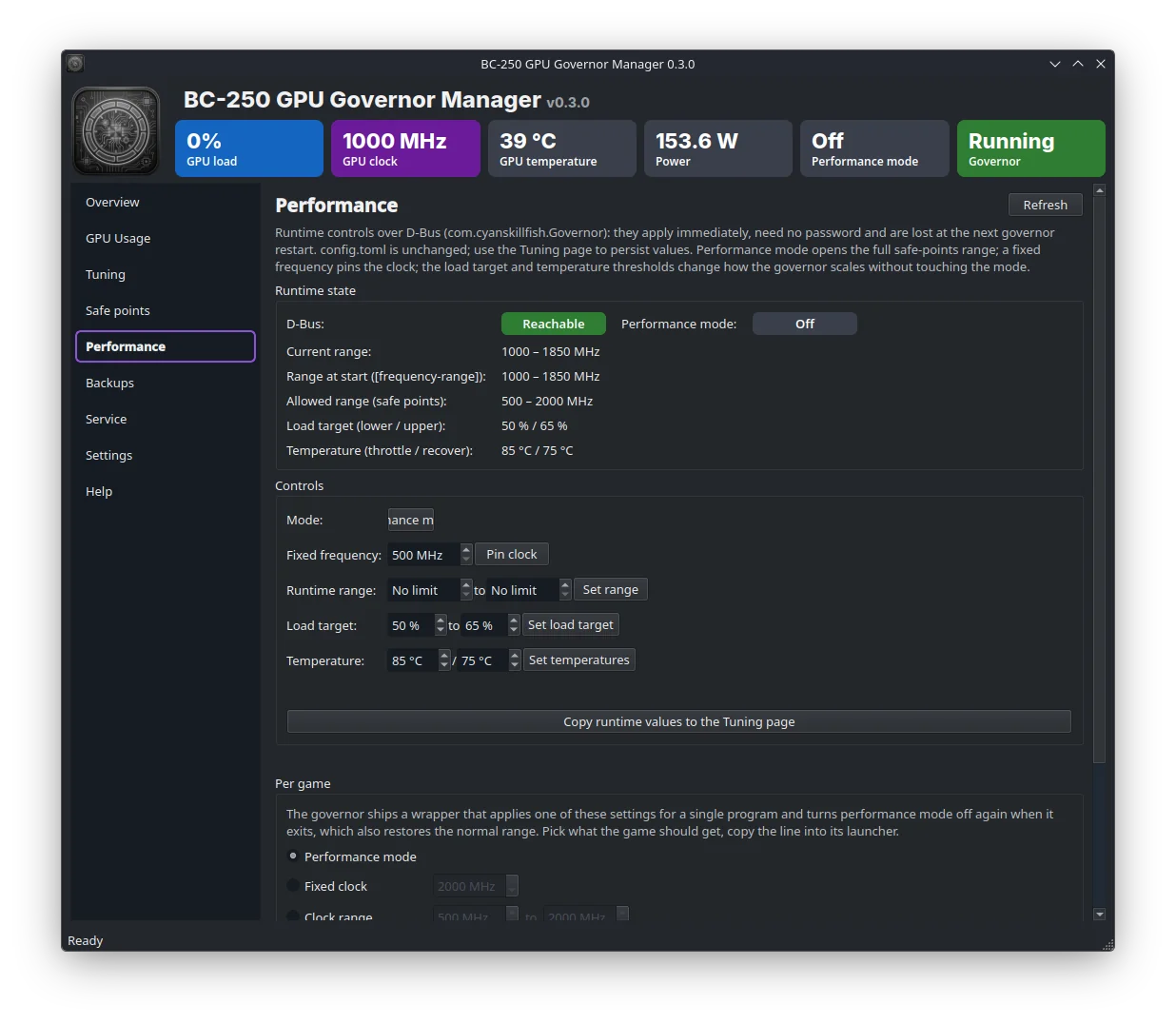
5 - Performance has these:
- runtime D-Bus controls for performance mode, a pinned clock, a runtime range, the load target and the temperature thresholds
- the live ranges and targets
- a button to copy them to the Tuning page
- a Per game generator for the governor's
cyan-skillfish-performance-modewrapper, with a Copy button
The generator covers performance mode, a fixed clock, a range, the load target and the temperature. It writes the line for Steam
%command%, Heroic/Lutris or a terminal. You need no password. Runtime changes last until the next governor restart.
🔽 6 - Backups
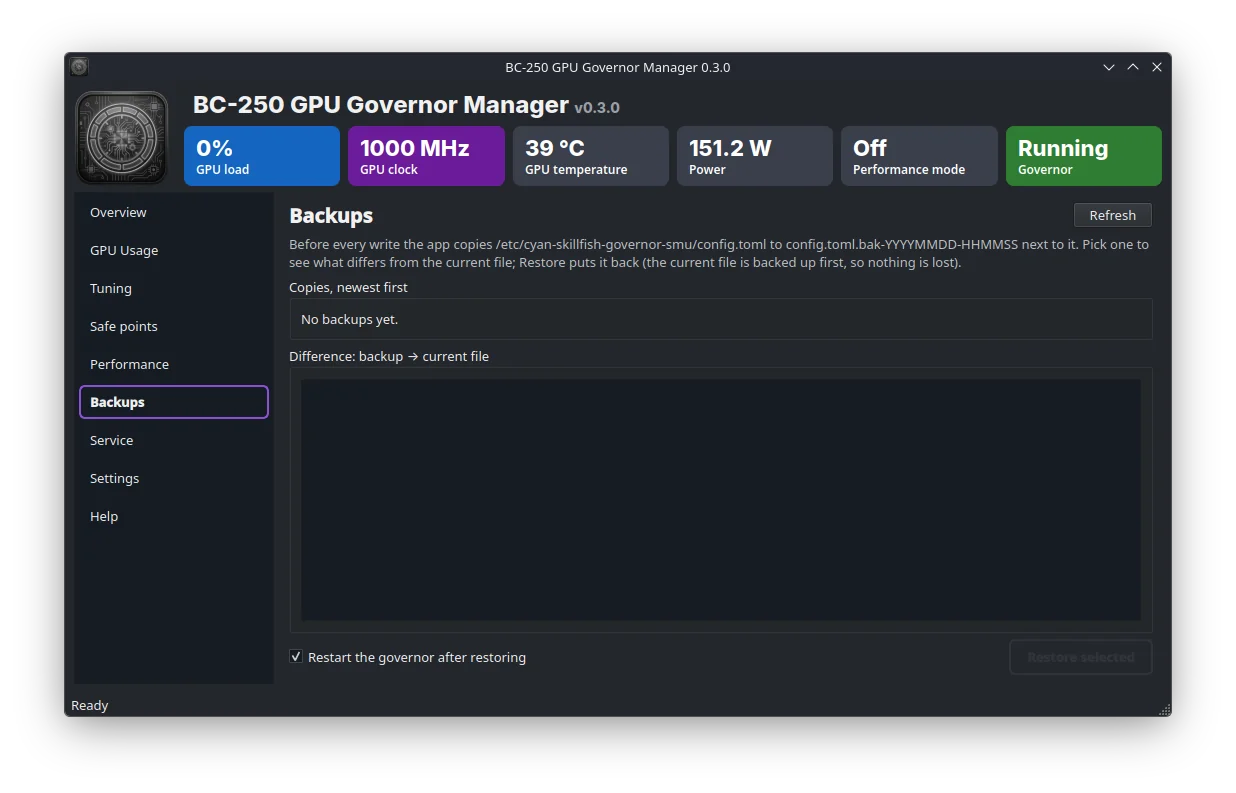
- 6 - Backups lists the
config.toml.bak-*copies. It shows a diff against the current file and restores a copy with one click. It also lists theconfig.toml.pre-oc-bisectcopy that BC-250 GPU OC Bisect made, with the date of the file. GPU OC Bisect is part of GPU Manager now, as the GPU sweep.
🔽 7 - Service
-
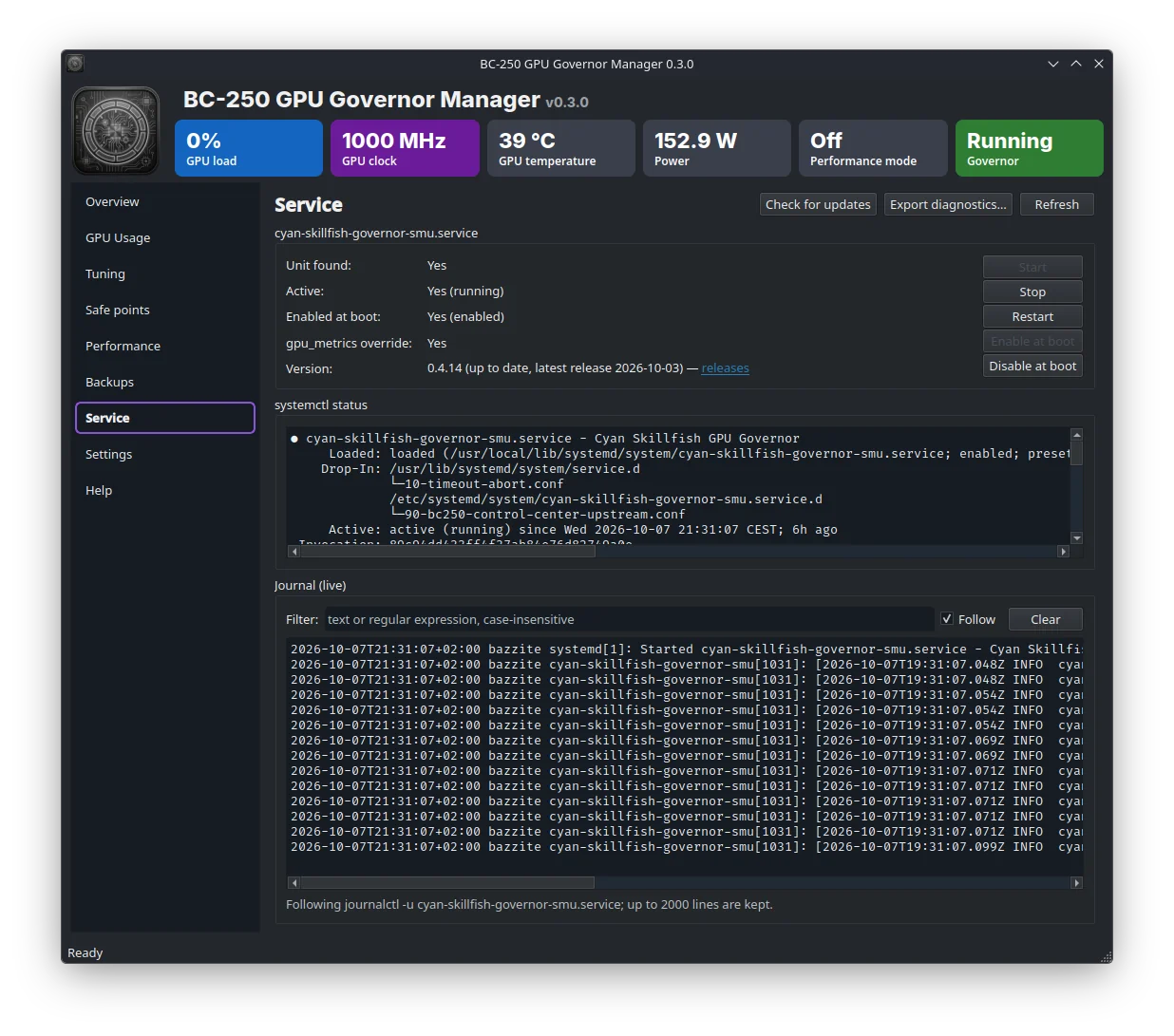
7 - Service has these:
- the unit state
- the five service buttons
systemctl status- a live journal tail that you can filter
- Export diagnostics…, which writes one text file for bug reports
- Check for updates, which compares the installed RPM with the latest GitHub release of the governor
The diagnostics file holds versions, config, status, journal and the raw
gpu_metrics. The update check also runs at start. You can turn that off in Settings.
🔽 8 - Settings
-
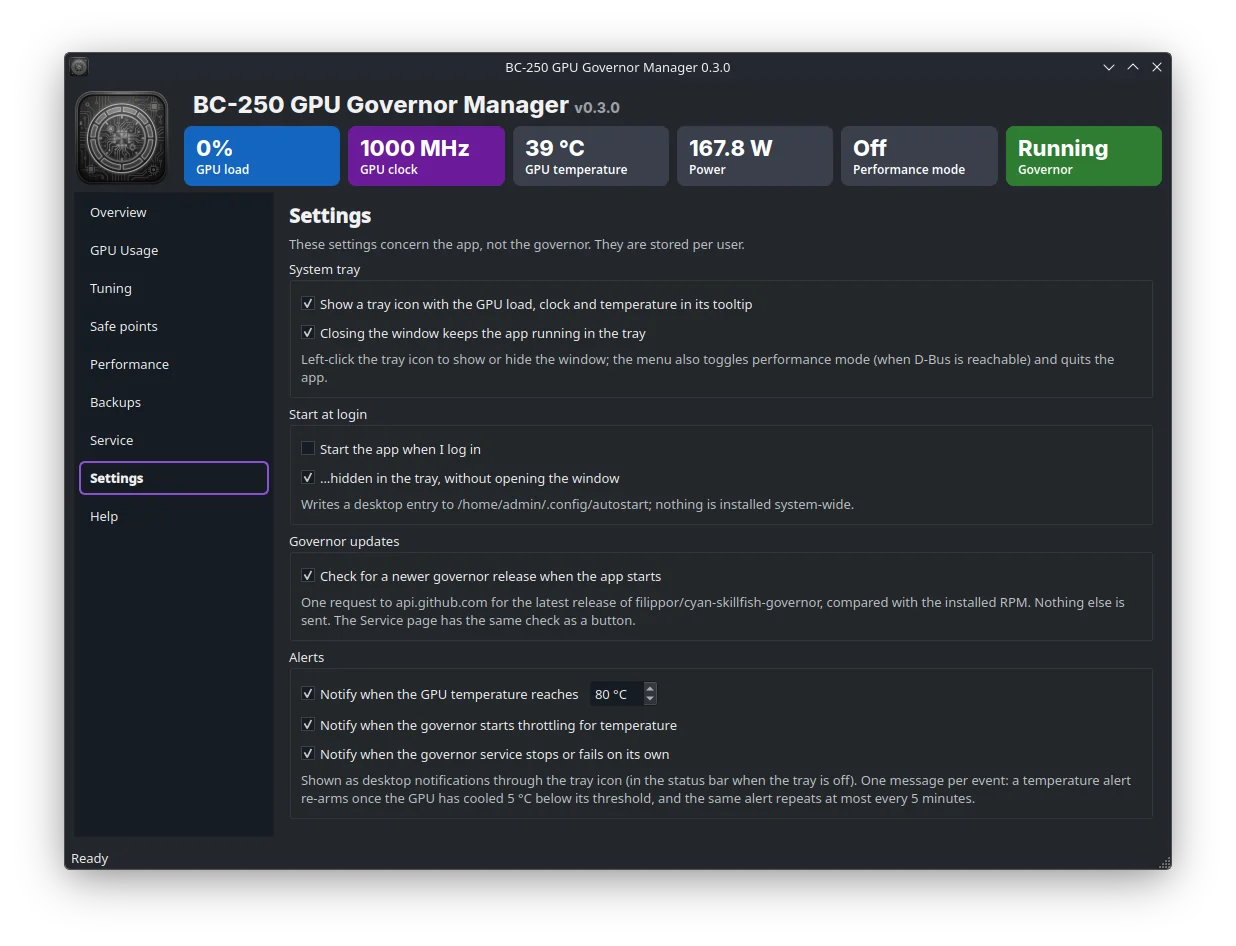
8 - Settings holds the app's own settings:
- a system tray icon
- close-to-tray
- a login autostart entry for your user in
~/.config/autostart - the governor update check at start
- alerts
The tray icon's tooltip shows load, clock and temperature. Its menu toggles performance mode, has an Apply profile submenu, shows or hides the window and quits. Alerts are desktop notifications. They come when the GPU reaches a temperature you choose or the governor's throttling temperature. They also come when the governor service stops or fails on its own. Each alert fires on the crossing, with hysteresis and a cooldown.
🔽 9 - Help
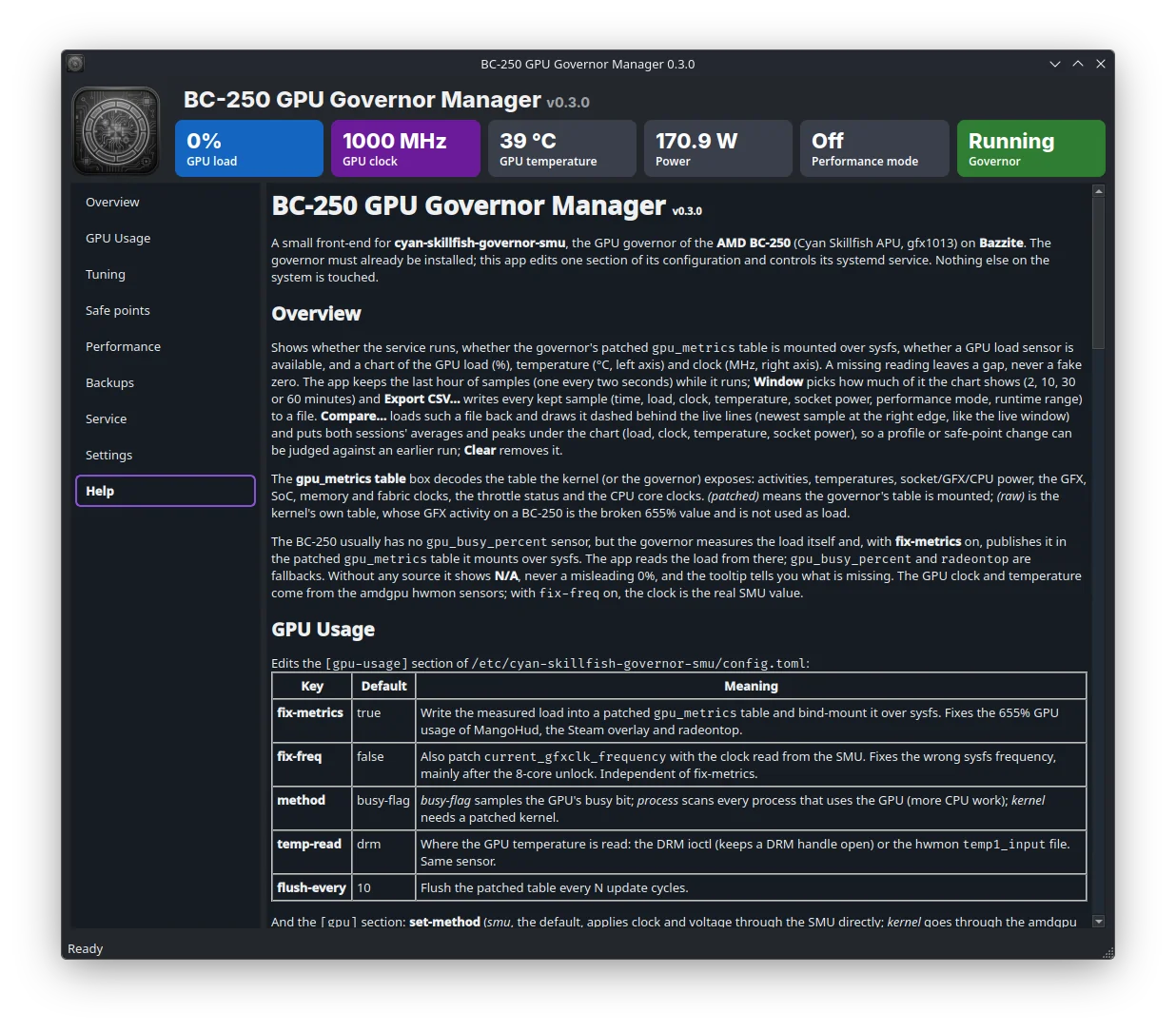
- 9 - Help has the same information inside the app, with links.
The app remembers the window size and the last page.
The GPU sweep
The GPU sweep finds the highest GPU clock and the lowest voltage your own board holds. Then it can write them into the governor's config. The GPU sweep pill at the bottom of the Safe points page opens its window.
No formula gives you the right GPU clock and voltage. The stable ceiling depends on these:
- your specific die, the silicon lottery
- your cooling
- your PSU rail
Two boards from the same batch can differ by 100 MHz or more. So the sweep tests it. It raises the clock or lowers the voltage one step at a time. It puts a heavy GPU load on each step that checks its own results. Then you see where your board stops being stable.
An overclock (OC) gives you more performance at the same voltage. An undervolt (UV) gives you the same performance with less heat and power.
Warning
The sweep restarts the GPU governor with raised clocks or lowered voltages. An unstable step can freeze the board. That is the point of the test, but save your work first. You can't change these hard rails:
- 2500 MHz ceiling
- 1100 mV ceiling
- 700 mV floor
- 97 °C abort
The community record of hard-locks above ~1850-2000 MHz is one reason for them. One bricked-board report from overvolting is the other. Use at your own risk.
The steps
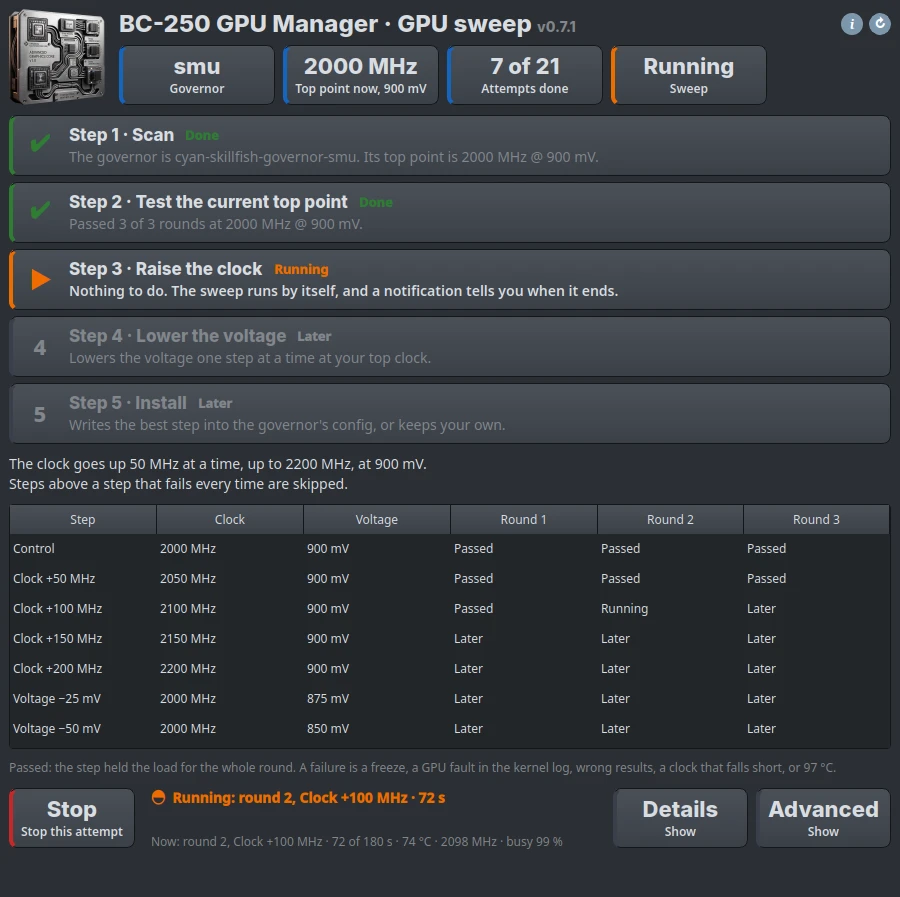
The window leads you through five steps. The step you do now has its button on its row.
| Step | What happens |
|---|---|
| Scan | Reads the GPU, the governor, its config's top safe-point and the load tool. It writes nothing and needs no password. |
| Test the current top point | The control. Your config's top point runs a load in every round, unchanged. A failing control means power, heat or the load tool is at fault. Then the window stops here. |
| Raise the clock | The top frequency goes up one step at a time, at a fixed voltage. A step is +50 MHz by default, up to 2200 MHz. The voltage is your config's top voltage by default. |
| Lower the voltage | The top voltage goes down one step at a time, at your top frequency. A step is -25 mV by default, down to 850 mV. |
| Install | Writes the best step into the governor's config. Or click Keep my config to install nothing. |
The governor can be cyan-skillfish-governor-smu or the older tt governor. The sweep uses the one whose service runs.
The table under the steps shows every step of the ladder with the outcome of each round.
For every attempt the sweep does this:
- puts a config in place whose top safe-point is the step under test
- restarts the governor and runs a verified GPU load
- watches the temperature, the clock and the GPU busy percentage the whole time
- puts your own config back and restarts the governor again
The test config keeps your other sections as they are, such as [gpu], [gpu-usage] and the timings. At 97 °C the
sweep stops the attempt and the run. Improve the cooling, then go on. An attempt gets the outcome NO-REACH when
the GPU never gets near the step's clock under full load.
Every step runs 3 rounds by default. All rounds of a step finish before the next step starts. So the sweep never drives past a step that is still failing. The sweep skips the steps beyond a step that fails every time.
The sweep is crash-safe. A marker file records the attempt that runs. After a freeze, switch the board off and on, and open the window again. The window asks whether the board froze. The sweep puts your config back first. It records the crash against the right step. Then it goes on where it stopped.
Verdicts
| Verdict | Meaning |
|---|---|
| passes every round | stable at this step |
| fails every time | past your die's limit at this voltage, so the ladder stops here |
| random | It sometimes passes and sometimes fails. The cause is power, heat or margin noise, not a clean limit. |
Install
Install writes the best step that passed every round, one step back from the edge as a margin. It asks first, then asks for your password. It works like this:
- It backs up the config as
config.toml.bak-<stamp>first. The Backups page restores it. - The best step becomes the config's top safe-point.
- The safe-points below it stay, except those whose voltage is above the new top's. Those go, because the governor wants a voltage that never drops as the frequency rises. So the sweep writes no voltage it did not test.
- The governor restarts with the new config.
When every lower safe-point has a voltage above the new top's, Install would leave only one point. Then Install is off.
To undo Install, restore its backup on the Backups page.
Advanced
Advanced shows the sweep's options. A sweep that has started keeps its ladder. To change it, click Start over.
| Field | Option | Default |
|---|---|---|
| Load per attempt | -t |
180 s, at least 60 s |
| Rounds per step | -r |
3, from 2 to 9 |
| Clock ladder voltage | --oc-volt |
your config's top voltage, at most 1100 mV |
| Highest clock | --max-freq |
2200 MHz, at most 2500 MHz |
| Clock step | --freq-step |
50 MHz, at least 25 MHz |
| Lowest voltage | --min-volt |
850 mV, at least 700 mV |
| Voltage step | --volt-step |
25 mV, at least 5 mV |
One boot each restarts the board after each attempt (--per-boot). The window opens again after the login and
goes on. Off, every attempt runs in this boot, with a 30 s cool-down between attempts.
When your governor's config changes during a sweep, the sweep stops until you click Start over.
The script
The window runs bc250-gpu-sweep.sh in the app's folder. You can also run it in a terminal, as your desktop user:
~/.local/share/bc250-governor-manager/bc250-gpu-sweep.sh --help      # every option
~/.local/share/bc250-governor-manager/bc250-gpu-sweep.sh              # the whole sweep, both ladders
~/.local/share/bc250-governor-manager/bc250-gpu-sweep.sh --status     # the results so far, and a report on the Desktop
~/.local/share/bc250-governor-manager/bc250-gpu-sweep.sh --install    # write the best step
Everything the sweep keeps lives in ~/.local/share/bc250-gpu-sweep/:
runs.tsv, with a line for every attempt- the logs of each attempt in
logs/ - the snapshot of your governor's config
Each line in runs.tsv holds the step, MHz, mV, outcome, errors and faults. It also holds the highest temperature,
clock and busy percentage. Report writes a readable report to your Desktop. A finished sweep writes one too.
For the CPU side, voltage and frequency through the SMU, see bc250_smu_oc from the BC-250 collective. The sweep sticks to the GPU curve on purpose.
Development
gpu_governor/
  __init__.py       app name, version, paths
  __main__.py       entry point (python -m gpu_governor)
  main_window.py    header, navigation, polling, pkexec and D-Bus actions
  pages.py          Overview and Service pages
  history.py        telemetry history ring buffer, CSV export/import and session summaries
  stress.py         load-generator detection and runner for safe-point tests
  kernelwatch.py    journalctl -k tail that aborts a safe-point test on amdgpu/SMU errors
  config_pages.py   GPU Usage and Tuning editors, presets
  performance_page.py  runtime D-Bus controls
  profiles.py       named profiles: JSON store and the Profiles box on the Tuning page
  instance.py       one instance per user: local socket that takes `show` / `profile NAME` requests
  safepoints_page.py   [[safe-points]] table and curve
  backups_page.py   backup list, diff, restore
  journal.py        live journalctl tail with filter
  diagnostics.py    diagnostics report for bug reports
  update_check.py   governor update check (rpm -q vs GitHub latest release, in a QThread)
  launch_options.py per-game launch option generator (Performance page)
  tray.py           system tray icon and autostart entry helpers
  settings_page.py  Settings page
  alerts.py         temperature / throttling / service alerts derived from the polled snapshot
  help.py           Help page
  widgets.py        status pills, metric boxes, terminal, rounded tooltip
  sweep/            the GPU sweep window (python -m gpu_governor --sweep), which runs bc250-gpu-sweep.sh
    app.py          its program: the window, one instance, the theme
    main_window.py  the five steps, the ladder table, Advanced and Details
    progress.py     where a sweep stands, read from the script's files
    session.py      runs the script in a pseudo-terminal, with sudo's password in a masked field
    options.py      the Advanced options as a command line
    resume.py       the autostart entry that goes on after a restart
  backends/
    base.py         GovernorConfig, ServiceStatus, GpuTelemetry, PerformanceState, backend protocol
    cyan_skillfish.py  schema-driven config.toml editing, systemd, sensors (smu governor)
    cyan_skillfish_tt.py  subclass for the older tt governor: fewer sections, no D-Bus
    gpu_metrics.py  gpu_metrics v2.1/v2.2 struct parser
    dbus.py         busctl client for com.cyanskillfish.Governor
    process.py      subprocess helper
  fonts/            Inter (SIL OFL), used for the header on Linux
bc250-gpu-sweep.sh  the GPU sweep's script
install.sh          per-user installer (venv, launcher, desktop entry, icon); --uninstall [--purge] removes it
bc250-governor-manager.desktop  desktop entry template, Exec is filled in by install.sh
tests/              pytest suite (offscreen Qt; bus, systemd and pkexec mocked)
To run the tests, run ./test.sh in the suite's root. It runs every test suite, this one included. Extra arguments
go to pytest, for example ./test.sh -k profile. For this app alone, run pip install -r requirements-dev.txt.
Then run QT_QPA_PLATFORM=offscreen python -m pytest -q tests.
The tests need no BC-250, because they mock D-Bus, systemd and pkexec. They cover these:
- the config.toml schema round-trip for both governors
- safe-point parsing and rendering
- the alert monitor
- the telemetry history and CSV export
- profiles
- the load-tool runner
- the main window's TestMode, profile and Performance-page state machines
- the GPU sweep's script from the scan to Install, with fake tools, and its window
The suite's CI (.github/workflows/ci.yml) runs them on every push and pull request. The mocks cannot prove
everything. For the rest, run the Hardware verification checklist by hand on a
BC-250 after each release.
Releases are tagged bc250-gpu-v<x.y.z> in the suite repository. Then .github/workflows/release.yml builds the
tarball and publishes it on GitHub. The tarball contains the installer.
The backend is separate from the Qt UI. So you can add other governors behind the same protocol, for example
cyan-skillfish-governor-tt.
License
GPL-3.0-or-later, see LICENSE. The
bundled Inter font is under the SIL Open Font License (gpu_governor/fonts/Inter-LICENSE.txt).
Hardware verification checklist
Run this check by hand on a real BC-250 for the features that the pytest suite can only cover with mocks. The board
runs Bazzite with cyan-skillfish-governor-smu.service. Run it after a release and check the boxes. Open an issue
for anything that fails. Wherever a command is given, compare the window with busctl and the journal.
Setup used:
- Release / tag:
v… - Governor version (
rpm -q cyan-skillfish-governor-smuor--version): - Kernel / Bazzite image:
- Date:
Useful shells to keep open:
journalctl -fu cyan-skillfish-governor-smu.service
watch -n1 busctl --system introspect com.cyanskillfish.Governor /com/cyanskillfish/Governor \
  com.cyanskillfish.Governor.PerformanceMode
1. Install
- [ ] Download
bc250-gpu-v<version>.tar.gzandSHA256SUMSfrom the suite's release.sha256sum --check --ignore-missing SHA256SUMSpasses. Or install from the portal. - [ ]
./install.shfinishes without errors. The desktop entry, the icon and the Desktop icon appear. - [ ] The Help page shows the released version number. It does not show
0.x.0-devor the repository value. - [ ] The tarball contains no
tests/,.github/orrequirements-dev.txt. - [ ]
./install.sh --uninstallremoves the launcher, venv and desktop entry. Install it again afterward.
2. Overview
- [ ] Telemetry (load, clock, temperature, power) matches the
busctl … get-propertyvalues and updates each poll. - [ ] The chart window combo offers 2 / 10 / 30 / 60 min. Switching re-scales the time axis. The group-box title shows the recorded span and stops growing at 60 min.
- [ ] Export CSV… proposes
bc250-telemetry-<date>.csvin the file dialog. The file has a header row and one line per sample. Theperf_enabledandrange_min/maxcolumns reflect the Performance page state. - [ ] Use Compare… with that export. Dashed lines appear right-aligned under the live ones. The note shows
"Reference
(…): load … clock … °C … W. Live window (…): …" and keeps updating. Clear removes it. The app refuses a non-telemetry CSV with a message. - [ ] Leave the app running for more than 1 h. Memory stays flat thanks to the ring buffer, and the chart keeps scrolling.
3. Tuning / config.toml
- [ ] Apply a change, for example the
frequency-rangeupper value./etc/…/config.tomlkeeps comments and untouched lines. Only the edited value changes. The service restarts and the journal shows the new value. - [ ] Safe points stay at the end of the file. The app appends newly added sections (
[timing.*],[frequency-thresholds]) after them with their header comment. - [ ] The Backups page lists the new backup. Restore brings the previous file back byte-for-byte.
- [ ] The app refuses invalid input before it writes anything. Try upper < lower and an unknown method.
4. Profiles
- [ ] Save current as… with a name that holds spaces or slashes stores a sanitized name in
~/.config/bc250-governor-manager/profiles.json. - [ ] Load into forms marks the page dirty without touching the file. Apply turns on.
- [ ] Apply now writes the file and restarts the service.
- [ ] The Apply profile submenu in the tray lists the same names. Applying from the tray shows a notification when the window is hidden.
- [ ] Delete removes the profile from both the combo and the tray submenu.
- [ ] Use Copy hotkey command and paste it into a terminal while the app runs. The running instance applies the profile, with a pkexec prompt and a tray notice. The terminal prints "handed to the running …" and exits at once.
- [ ] A wrong name gives a tray warning and no dialog. Bound to a key in System Settings → Shortcuts, the command does the same.
- [ ] Launch the app a second time from the menu or a terminal. It raises the existing window instead of adding a second tray icon.
- [ ]
--profilewith the app not running starts it and applies. - [ ] Switching between a smu and a tt profile does not write unsupported keys. Check this if both are installed.
5. Performance page
- [ ] Turn performance mode on and off. The
Enabledproperty flips. The clock trace on the Overview honors the fixed frequency and range. - [ ] After Set load target,
busctl … get-property … LoadTarget*shows the new pair. The forms do not reset while you edit. They refill when the governor reports different values. - [ ] The app takes a throttle / recovery pair with Set temperatures. 0 shows as "Not set". An invalid pair turns the button off and shows the hint.
- [ ] While a safe-point test runs, load / temperature changes do not end the test. The status stays "Testing…". Enable, Set fixed frequency and Set range do end it.
6. Safe-point test (TestMode)
- [ ] Start test asks for pkexec once and pins the frequency/voltage.
busctl … TestModereports it. The Overview clock trace sits at the pinned value. - [ ] The timer running out, Stop, closing the window and the governor going away each release the point. They
also stop the load tool. Check that
pgrep vkmark|glmark2|vkcube|glxgearsis empty. - [ ] The load combo lists only tools present on PATH. "(none)" works without starting anything.
- [ ] Run with
vkmarkorglmark2. GPU load rises on the Overview and the temperature climbs. The result line shows held time, tool name, peak °C and clock range. - [ ] Kill the load tool by hand during the test. The live status and verdict mark the tool as exited/crashed. The test itself keeps running until Stop or the timer.
- [ ] For a user in
systemd-journal/wheel, the live status says "Kernel log watched". - [ ] For a user outside those groups, it says "Kernel log not readable, no hang detection". The verdict then says "kernel log not watched".
- [ ] After a clean run, the verdict ends with "no GPU errors in the kernel log".
- [ ] Hang detection works. With a test pinned, run
sudo sh -c 'echo "<3>amdgpu: ring gfx_0.0.0 timeout (checklist)" > /dev/kmsg'. It aborts the test within a second, and the verdict quotes the line. The tray shows a warning icon, andbusctlshowsEnabledfalse. - [ ] Add to table inserts the tested pair in sorted order. Testing the same frequency again replaces the row.
- [ ] Try a deliberately unsafe point with too low a voltage. The governor and the GPU recover. The window reports the governor gone, or a verdict. No pkexec prompts get stuck. Have a reboot plan ready.
7. Alerts
- [ ] In Settings → Alerts, set the temperature threshold a few degrees below the current reading. You get one tray notification and one status-bar line. It does not repeat until the temperature drops ≥ 5 °C and climbs back, or 5 min pass.
- [ ] The throttle alert fires when the reading crosses the governor's throttle temperature. That is the
Performance page value, or else
temperaturein config.toml. - [ ] Run
sudo systemctl stop cyan-skillfish-governor-smu.serviceafter the app has seen the service running. You get a "service stopped" alert. Runstartagain. - [ ] Launch the app while the service is already stopped. No false alert appears.
- [ ] Turning off each alert in Settings silences only that kind.
8. Tray / lifecycle
- [ ] Close to tray, restore, and quit from the tray. The terminal shows no "QProcess destroyed while running". The load tool and TestMode are released.
- [ ] The launch options for autostart and for starting minimized behave as labeled.
- [ ] Right after a release, the update check reports the running version as current.
Result
- [ ] All boxes checked for release
v…on<date>. - Issues opened: …