Tools for every part of the board.
Get the most out of your BC-250.
Beta The suite is in active development: features and layout may still change between releases.
Lots in the suite
Diagnostics
Bazzite Test checks, stress-tests and benchmarks the board, BIOS Reader shows every BIOS setting, hidden menus too, and System Overlay keeps CPU, GPU, fan and temperatures on top, USB IPS3.5 shows them on a small USB screen, Fan Control guards the board against overheating, and USB Wi-Fi brings the driver for AIC8800D80 Wi-Fi sticks.
Tuning
GPU Governor Manager tunes the GPU governor, GPU OC Bisect finds your board's safe overclock and undervolt, and Persistent ACPI gives the CPU its C-states and frequency scaling.
Unlocks
CU Bisect and Cores Bisect tell bad CUs and cores apart from an unstable unlock, and Memory Manager sets the VRAM split.
Gaming
BC-250 Upscaler Manager deploys an FSR 3.1 drop-in upscaler into games, and ACE Queues and Mesh Shaders bring async compute and mesh shaders, beside the system Mesa.
PlayStation
shadPS4 Manager plays PS4 games with the shadPS4 emulator, RPCS3 Manager PS3 games with the RPCS3 emulator, and Console Link finds, wakes and registers PS4 and PS5 consoles for Remote Play.
Living room
HDMI CEC Manager turns the TV on and off with the board, SFTP Tools moves files between computers, USB HD Cam makes the PS5 HD Camera a webcam, USB HD Control updates the DualSense's firmware, and Decky Loader Manager adds plugins to Game Mode.
One portal for every app
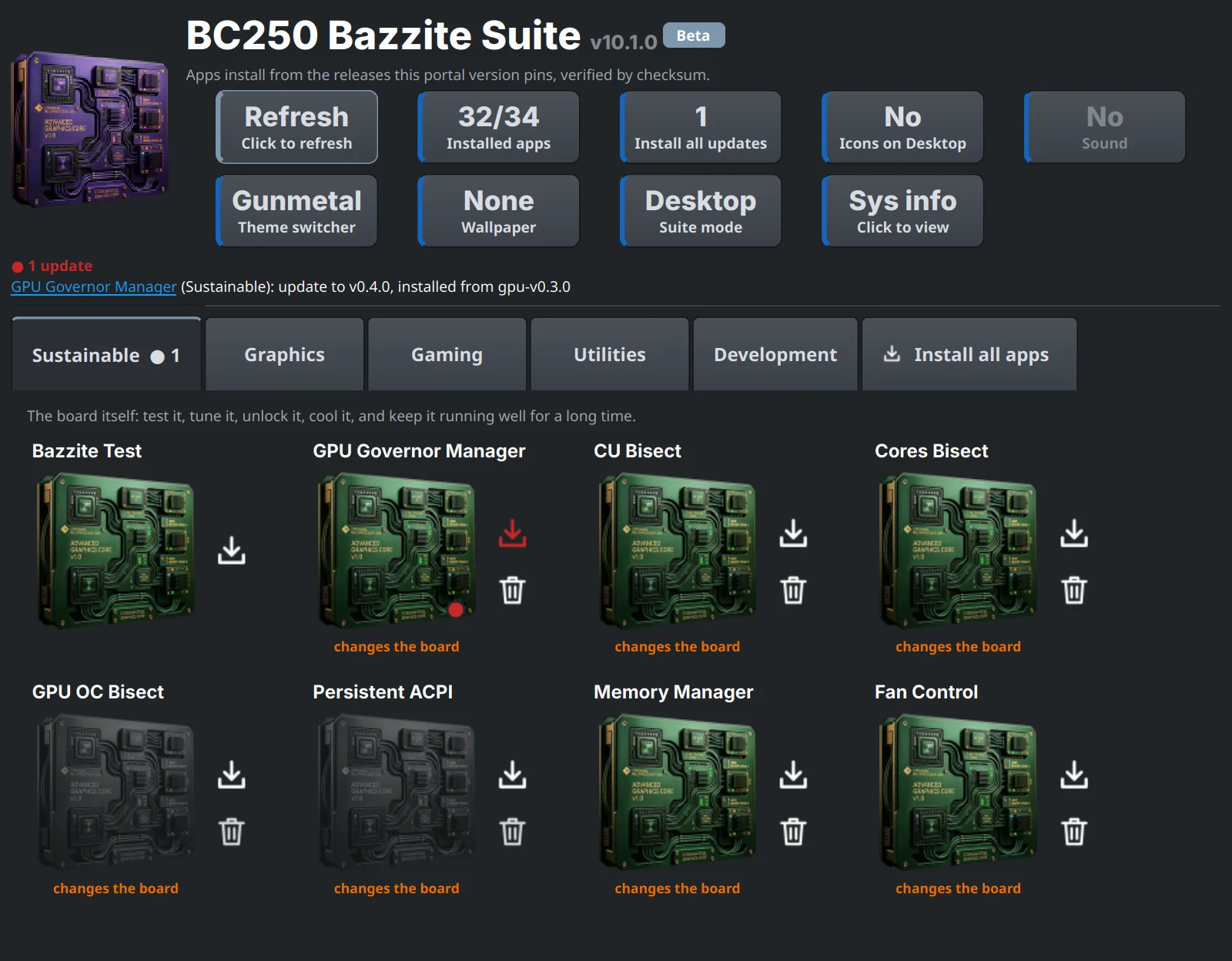
The portal installs, opens, updates and removes the apps. Each app is a tile: click its icon to open it, and use the buttons beside it to install or uninstall. A red dot shows an update. Apps that change the board are marked, and the portal asks before it installs or opens them.
Get started
Ready to set up your BC-250 board? Download the latest portal release on the board, check it with SHA256 and run its installer. It installs BC-250 Bazzite Test with it, every other app installs from the portal.
FAQ
Do the apps change my board?
Only the apps marked changes the board: the unlocks, the GPU governor, GPU overclocking, the ACPI override, the VRAM split and the patched GPU drivers. They are software-only and can be undone, and the portal asks before it installs or opens them. BC-250 Bazzite Test and BIOS Reader only read.
How do I undo a change?
In the app that made it: each of these apps has an Uninstall, Remove or Undo. Uninstalling an app does not undo what it changed on the board, so undo that first. What stays after an uninstall lists each app and how to undo it.
Do the apps change Bazzite's own driver?
No. ACE Queues and Mesh Shaders build their RADV beside the system Mesa, which stays as it is, and games use it only when you say so. Bazzite's own packages and their updates are Bazzite's.
Do I have to install the apps one by one?
No. Install the portal; it installs, updates and removes the apps, each from a tested release that it checks before it unpacks it. See Install.
Does it work on other boards or systems?
The suite is made and tested for the AMD BC-250 running Bazzite.
How do I check a download?
Every release comes with a SHA256SUMS file: run sha256sum --check --ignore-missing SHA256SUMS before you
install. See the security policy.
Is it open source?
Yes. The code of every app is on GitHub, under the licenses below.
What does the suite know about me?
Nothing it sends anywhere: no accounts, statistics or crash reports. What goes over the network, and when, is on the Privacy page.
Where do I get help?
Open an issue on GitHub. For a security problem, use Security → Report a vulnerability instead, as the security policy says.
License
GPL-3.0-or-later, except BC-250 Persistent ACPI, which is MIT, Console Link, which is AGPL-3.0 (its
protocol code comes from chiaki-ng), and Bazzite NetcatGUI, which is GPL-2.0 (a port of NetcatGUI). Each app has
its own LICENSE. The icons were made with generative AI tools and edited by hand in Photoshop, the sounds and the
music of the video tours with generative AI tools; all are under the license of the app or tool they come with, like its
code.
Disclaimer
The BC250 Bazzite Suite is an independent community project. It is not affiliated with or endorsed by AMD, ASRock, the Bazzite / Universal Blue project, Sony, Microsoft, Nintendo, Valve, or the makers of the emulators and the other programs the apps work with. BC-250 is AMD's product name and Bazzite the Universal Blue project's. PlayStation, PS4, PS5, PS3, PS2, PSP, PS Vita, DualSense and Remote Play are Sony's; Xbox, Xbox 360, Xbox Cloud Gaming and Windows are Microsoft's; Steam, Steam Deck and Big Picture are Valve's; the names of Nintendo's consoles, of the emulators (shadPS4, RPCS3, PPSSPP, PCSX2, Vita3K, Xenia) and of Decky Loader, HelixSR and DirectMesh belong to their owners. The suite uses them only to say what it works with.