BC-250 CU Bisect
Tells bad CUs apart from an unstable CU unlock on the AMD BC-250 (Cyan Skillfish, gfx1013).
Every BC-250 die differs: AMD fuses off WGPs that failed validation. But a crash after a CU unlock doesn't have to mean a bad WGP. A runtime unlock writes GPU registers while the driver is running, the kernel and RADV keep their 24-CU view, and extra CUs draw more power at the same voltage. Crashes that move from one CU pair to another usually point to the unlock, power or heat, not to bad silicon.
bc250-cu-bisect.sh does its own unlock, so no other tool is involved, and tests in a way that separates
these causes.
Warning: this writes GPU registers. A bad WGP or the unlock itself can freeze the system. Save your work first. Use at your own risk.
Unlocking extra CUs, step by step
New here? This is the whole process, start to finish. If you only read one section, read this one.
What you're doing: your board ships with 24 CUs active. Up to 16 more are switched off. Some of them are genuinely defective (AMD fused them off for a reason), some are perfectly fine. These scripts find out which, and then switch on the good ones at every boot.
The only three outcomes. The GPU is built as 4 identical "shader array" rows and it feeds all 4 in lockstep, so a row with fewer active CUs holds the other three back. That means only three settings do anything useful, and the tools here will not let you install anything else:
| Setting | Mask | What you get |
|---|---|---|
| 24 CUs (default) | 0x07,0x07,0x07,0x07 |
What the board does out of the box |
| 32 CUs | 0x0f,0x0f,0x0f,0x0f |
+1 good WGP on each of the 4 rows |
| 40 CUs (max) | 0x1f,0x1f,0x1f,0x1f |
+2 good WGPs on each of the 4 rows |
Anything in between (e.g. 5 extra CUs on one row, none on another) is rejected: it would boot and run, just no faster than 24 CUs, while using more power and making more heat. So realistically you're aiming for 32, and trying for 40.
Step 1 — Install the prerequisites and read the warning.
See Requirements and Before you start. You need umr, and ideally
memtest_vulkan. Close your games, save your work: this will freeze the machine at some point, by design.
Step 2 — Find out which switched-off CUs are good (bc250-cu-bisect.sh).
chmod +x bc250-cu-bisect.sh
./bc250-cu-bisect.sh
It tests one switched-off WGP (= 2 CUs) at a time, under real GPU load, then asks you to reboot and
run it again for the next one. There are 8 switched-off WGPs and 3 test rounds each, so about 27 boots
in total — expect this to take a day or two of on-and-off fiddling. Use --auto if you want it to reboot
by itself without asking (see Running truly unattended).
Each WGP ends up GOOD, FAILS EVERY TIME (bad silicon — leave it off) or RANDOM (see Results).
Step 3 — Read the suggestion at the end. When every WGP has a verdict, the script prints the best even mask your board supports, e.g.:
- WGPs that passed every round: SE0.SH0.WGP3 SE0.SH1.WGP3 SE1.SH0.WGP3 SE1.SH1.WGP3
  Combined: 0x0f,0x0f,0x0f,0x0f (32 CUs, WGPs per row: 4 4 4 4).
If one row had a bad WGP, the script automatically trims the others down to match, so what it suggests is always 24, 32 or 40 — never a lopsided number like 38.
Step 4 — Retest that exact combination (this step is not optional). WGPs that each pass alone can still fail together, because more active CUs means more power draw at the same voltage. So run the suggested command, which tests the full combined mask in one go:
./bc250-cu-bisect.sh --reset && ./bc250-cu-bisect.sh --baseline 0x0f,0x0f,0x0f,0x0f --control-only --rounds 1
(Replace the mask with whatever your run suggested.) This is a single boot, not another 27.
Step 5 — Make it permanent (bc250-cu-unlock.sh).
A CU unlock is only ever register writes — nothing is burned into the chip — so it's gone after a reboot.
This second script reapplies it automatically at every boot, as a system service that runs before your
desktop starts:
chmod +x bc250-cu-unlock.sh
sudo ./bc250-cu-unlock.sh --install 0x0f,0x0f,0x0f,0x0f
That's it — from now on the board comes up with 32 (or 40) CUs on every boot, including cold boots and after system updates. It refuses the install if the mask isn't one of the three even settings.
Step 6 — Verify it's actually live.
sudo ./bc250-cu-unlock.sh --status # "Live masks now:" is read straight off the GPU
Trust that line over any CU count shown by other GPU tools — most of them cache the number the driver saw at boot (see the note further down).
Step 7 — Want to go back?
sudo ./bc250-cu-unlock.sh --uninstall # stock 24 CUs again from the next boot
Do this if the system starts misbehaving later: a WGP that passed the tests can still turn out unstable under a different game or a hotter room.
Prefer clicking over typing? There are two optional GUIs that do exactly the same thing: BC Bisect GUI for steps 2–4 and BC Unlock GUI for steps 5–7. The Unlock GUI shows a green ACCEPTED banner only once your results actually justify the mask, and grays out Install otherwise.
How it works
The script writes the three registers of a runtime CU unlock with umr:
| Register | Per shader array | Meaning |
|---|---|---|
CC_GC_SHADER_ARRAY_CONFIG |
yes | Bits 16-20 mark WGPs inactive; cleared to 0 |
SPI_PG_ENABLE_STATIC_WGP_MASK |
yes | WGPs that get work (5 bits, 2 CUs each) |
RLC_PG_ALWAYS_ON_WGP_MASK |
no | Union of the four SPI masks |
The BC-250 has 4 shader arrays (SE0.SH0, SE0.SH1, SE1.SH0, SE1.SH1) of 5 WGPs: 40 CUs. Stock is 24.
             WGP0   WGP1   WGP2   WGP3   WGP4      mask (bit4..bit0)
             bit0   bit1   bit2   bit3   bit4
SE0.SH0       ██     ██     ██     ..     ..      0x07
SE0.SH1       ██     ██     ██     ..     ..      0x07
SE1.SH0       ██     ██     ██     ..     ..      0x07
SE1.SH1       ██     ██     ██     ..     ..      0x07

██ baseline, always unlocked (the stock 24 CUs)   .. locked WGP, 2 CUs, not yet tested
Each row is a 5-bit SPI_PG_ENABLE_STATIC_WGP_MASK value: WGP0 is bit 0, WGP4 is bit 4, a set bit means
that WGP is unlocked (2 CUs). Reading the stock row above left to right gives 00111 = 0x07 (WGP0-2
unlocked, WGP3-4 locked). A fully-unlocked row (all 5 WGPs, 11111) is 0x1f. The 4 rows are always
written together as SE0.SH0,SE0.SH1,SE1.SH0,SE1.SH1, so the stock baseline above is 0x07,0x07,0x07,0x07
(24 CUs) and a fully unlocked board would be 0x1f,0x1f,0x1f,0x1f (40 CUs) - this is exactly the format
--baseline takes and --status/the GUI print back.
That's the default layout: 3 of the 5 WGPs per shader array ship unlocked (24 CUs), the other 2 per array
(8 WGPs, 16 CUs) are fused off at the factory and are what this script tests one by one. The script shows
this same map live while it runs, with >> on the WGP under test and ok/xx/?? once a WGP has a
verdict (GOOD/FAILS EVERY TIME/RANDOM) — see Results.
Only 24, 32 or 40 CUs exist. The GPU front-end splits work across the 4 shader arrays in lockstep; the slowest row caps them all. Unlocking WGPs on only one or two rows doesn't speed anything up, because the other rows still bottleneck at their old CU count — the extra CUs just sit idle, hot and powered. So the only configurations worth having unlock the same number of WGPs on every row:
WGPs per row Mask Total CUs 3 0x07,0x07,0x07,0x0724 (stock/default) 4 0x0f,0x0f,0x0f,0x0f32 5 0x1f,0x1f,0x1f,0x1f40 (max) (The per-row mask doesn't have to be
0x0f/0x1fexactly — if WGP3 is bad on a row but WGP4 is good,0x17is also 4 WGPs. What matters is that all 4 rows unlock the same count.)
bc250-cu-unlock.shand the Unlock GUI refuse anything else: an uneven mask like0x1f,0x1f,0x07,0x07(5/5/3/3) is rejected with an error instead of installed.
The test plan:
- Control: the same register writes with your baseline masks, so no extra CUs. If the control fails, the unlock method, power or heat is at fault, and the WGP verdicts can't blame your CUs.
- One step per locked WGP: baseline + that single WGP (2 CUs). Every locked WGP is tested on its own.
- Rounds: every item runs several times (default 3), interleaved, so heat and time don't favor one item.
- One attempt per boot (default): every attempt starts from the clean driver state.
- Idle writes: the masks are only written while the GPU is idle, then read back. During the load they are read again every 10 s to catch masks that drift.
- Correctness, not only crashes:
memtest_vulkanreports wrong results. vkpeak, vkmark and glmark2 are used when it's missing, but only show crashes. - Crash-safe: before every phase the script saves what it's doing. After a freeze, cold boot and run it again: it records the crash, with the phase (writing the masks or under load) and the GPU faults in the kernel log of the previous boot.
Requirements
- AMD BC-250, Linux with bash 4+. Tested against Bazzite (Fedora Atomic).
umr, owned by root, in/usr/bin,/usr/sbinor/usr/local/bin. On Bazzite:sudo rpm-ostree install umr, then reboot. "Already requested" means it's waiting for that reboot.- A GPU load tool, preferably memtest_vulkan
in
~/.local/bin(or vkpeak, vkmark, glmark2). - sudo rights (for umr and the kernel log only).
Before you start
- Every boot must start at the stock state: turn off anything that applies a CU unlock at boot, and don't run other CU tools during the test. The script refuses to start when an unlock is already active.
- Cap the GPU governor at 1500 MHz (for example in
/etc/cyan-skillfish-governor-smu/config.toml), so power and heat don't hide the result. The script warns when the ceiling is higher. - Close games and video players.
Usage
Run it as your normal user:
chmod +x bc250-cu-bisect.sh
./bc250-cu-bisect.sh                 # baseline = the stock masks of this boot, 3 rounds, 180 s load
./bc250-cu-bisect.sh -t 300 -r 5     # longer load, more rounds
./bc250-cu-bisect.sh --baseline 0x07,0x07,0x07,0x07   # start from masks you trust
./bc250-cu-bisect.sh --baseline 0x0f,0x0f,0x0f,0x0f --control-only --rounds 1   # re-validate a combined mask, control only
./bc250-cu-bisect.sh --status        # results so far, report on the Desktop
./bc250-cu-bisect.sh --same-boot     # no reboots: restore the baseline live between attempts
./bc250-cu-bisect.sh --auto          # no prompts, auto-reboot after each attempt (see below)
./bc250-cu-bisect.sh --reset         # delete the results and start over
./bc250-cu-bisect.sh --help
After each attempt it offers to power off (best, a cold boot) or reboot. Power on and run it again until
all attempts are done. With 3 rounds and 8 locked WGPs that's 27 boots; --same-boot is faster but every
attempt then inherits the state of the previous one.
How long a full run takes
Total attempts = rounds × (1 control + locked WGPs). Each attempt itself takes about 15 s settle +
the load time (--time, default 180 s) + a few seconds overhead, so roughly load time + 20 s of
active GPU time per attempt. On top of that:
| Test type | Per-attempt overhead | Example: 3 rounds, 8 locked WGPs (27 attempts), default 180 s load |
|---|---|---|
| Default (reboot/power-off between attempts) | a full boot (and your own click-through time) | 27 × (~200 s + a boot) -- typically 2-3 hours including reboots |
--same-boot |
30 s cooldown, no reboot | 27 × ~230 s ≈ 1 h 45 min hands-off |
--auto (+ the systemd unit, see below) |
a full boot, but no manual steps | same wall-clock as the default mode, but unattended |
--control-only |
only the control item is tested | rounds attempts instead of rounds × (1 + WGPs), e.g. 3 instead of 27 |
More rounds (-r) or a longer load (-t) scale the total time linearly; more locked WGPs add one
more item (and rounds more attempts) each.
Running truly unattended (--auto checklist)
Clicking through 27 reboots by hand is slow. --auto keeps the same one-attempt-per-boot isolation
(no loss of correctness) but removes the manual steps:
- it doesn't ask anything (an unfinished attempt is assumed to be a crash, warnings are passed through),
- it reboots on its own when more attempts are left, instead of asking.
Combine it with the included systemd user unit so the script also relaunches itself after every login, turning the whole bisect into a loop you only have to start once:
mkdir -p ~/.config/systemd/user
cp bc250-cu-bisect-auto.service.example ~/.config/systemd/user/bc250-cu-bisect-auto.service
# edit ExecStart in that file to the real path of bc250-cu-bisect.sh
systemctl --user enable --now bc250-cu-bisect-auto.service
systemctl --user status bc250-cu-bisect-auto.service
--auto makes the script hands-off, but the system must get back to your session on its own:
- Autologin — after each reboot someone must log in, or the run stalls at the login screen. Enable it in your desktop (Bazzite/KDE: System Settings → Colors & Themes → Login Screen (SDDM) → Behavior → auto-login, or Users → auto-login on GNOME).
- It still needs sudo for
umrand the kernel log, without a password prompt (there's no terminal to type one into). Add a sudoers drop-in:
echo "$USER ALL=(ALL) NOPASSWD: ALL" | sudo tee /etc/sudoers.d/bc250-cu-bisect
sudo chmod 440 /etc/sudoers.d/bc250-cu-bisect
sudo visudo -cf /etc/sudoers.d/bc250-cu-bisect   # must print "parsed OK"
sudo -k && sudo -n true && echo OK    # must print OK without asking
sudo rm /etc/sudoers.d/bc250-cu-bisect.
If you edit the file by hand, use sudo visudo -f /etc/sudoers.d/bc250-cu-bisect: it refuses to save a broken line.
A broken line makes every sudo command print a warning, or stops sudo working at all.
systemctl reboot is tried first with --no-ask-password (so it fails instead of popping up a GUI
auth dialog nobody is there to answer), falling back to sudo -n systemctl reboot; if both fail the
script stops instead of hanging and tells you to reboot by hand. Add passwordless sudo for
systemctl reboot/poweroff too if your desktop doesn't already allow the logged-in user to do that
directly (most do).
For a truly unattended run (e.g. overnight), make sure of this as well:
- The autostart unit installed — without it nothing restarts the script after login, and you'd have to start it manually every boot.
- No credential popups at login (KDE Wallet / ksshaskpass) — with autologin the KDE Wallet can't auto-unlock, so a "SSH credentials" / wallet dialog can appear at session start and block the chain until answered. Either give the wallet a blank password (open it in
kwalletmanager5first, then Change Password → empty), or disable the wallet subsystem (Plasma 6 has no UI checkbox for it anymore):
kwriteconfig6 --file kwalletrc --group Wallet --key Enabled false # kwriteconfig5 on Plasma 5
Re-enable afterward with ... --key Enabled true. Also uncheck "Use KWallet for the Secret
Service interface" in System Settings → KDE Wallet so apps don't route secrets to the disabled wallet.
Check on it while it runs:
systemctl --user status bc250-cu-bisect-auto.service   # ran / running / failed this boot
tail -f ~/.local/share/bc250-cu-bisect/auto.log         # live output of the current attempt
./bc250-cu-bisect.sh --status                           # progress and results so far
When all attempts are done the script stops rebooting on its own, and in --auto mode it also
disables bc250-cu-bisect-auto.service and removes the optional live-output autostart entry (below)
by itself, so nothing starts at the next login. Starting a new --auto run re-enables the unit again
automatically if it's still installed but was left disabled; it warns instead if the unit isn't
installed at all (meaning the run couldn't have continued past a reboot). If you ran without --auto,
disable the unit manually: systemctl --user disable --now bc250-cu-bisect-auto.service.
A real freeze still needs a manual power cycle, same as without --auto; the script picks the resume
back up from there as usual.
Want the live output on screen instead of a log file? Add a desktop autostart entry that opens a
terminal following it at every login (KDE example; see the comments in
bc250-cu-bisect-auto.service.example):
cat > ~/.config/autostart/bc250-cu-bisect-watch.desktop <<'EOF'
[Desktop Entry]
Type=Application
Name=BC-250 bisect live output
Exec=konsole --title "bc250-cu-bisect" -e tail -n 40 -f .local/share/bc250-cu-bisect/auto.log
EOF
Results
While it runs, and in the summary/report, the same CU map shows where it's at:
             WGP0   WGP1   WGP2   WGP3   WGP4
SE0.SH0       ██     ██     ██     ok     ..
SE0.SH1       ██     ██     ██     xx     ..
SE1.SH0       ██     ██     ██     ..     ??
SE1.SH1       ██     ██     ██     >>     ..

██ baseline  >> testing now  ok passed every round  xx fails every time  ?? random  .. not tested yet
Outcomes per attempt:
| Outcome | Meaning |
|---|---|
PASS |
Load ran the full time, no errors, no kernel faults, masks held |
ERRORS |
memtest_vulkan reported wrong results |
FAULT |
GPU fault in the kernel log (ring timeout, GPU reset, page fault, ...) |
LOAD-FAIL |
The load tool stopped early |
CRASH-LOAD |
The system went down under load |
CRASH-APPLY |
The system went down while writing the masks on an idle GPU |
DRIFT |
The masks changed after they were written |
MISMATCH |
The masks didn't read back as written |
ABORTED |
Stopped by hand; the attempt runs again |
Verdict per WGP:
- GOOD: passed every round.
- FAILS EVERY TIME: likely a bad WGP; leave it locked. "(memory errors)" when memtest_vulkan found errors.
- RANDOM: failed in some rounds only. A bad WGP normally fails every time, so this points to the unlock method, power or heat.
CRASH-APPLY, DRIFT and MISMATCH point to the unlock itself. When the control fails, the WGP
verdicts are not reliable.
Note: "GPU load only reached X%" even on a healthy PASS. BC-250 boards are Van Gogh (Steam Deck) APUs salvaged off a cloud-gaming blade and run without the original laptop's EC/ACPI firmware; the community's coreboot/ACPI bring-up gets far enough for boot, display and basic power management, but it isn't a byte-for-byte match of the PowerPlay/pptable data the SMU firmware expects. As a result, the
gpu_busy_percentsensor the script reads can stay near 0% even while the GPU is genuinely under load. If the clock (max sclk MHz) still boosts under load and drops on a failing WGP (as it should), that's the SMU's real DPM/boost logic reacting correctly — the load was real, only the busy% telemetry is unreliable on this hardware. Don't treat a low/0% busy reading by itself as a sign the test didn't actually stress the GPU.
When everything is done and the control passed, the script suggests a combined mask of the good WGPs.
WGPs that pass one by one can still fail together (more power at the same voltage), so test the
combination: ./bc250-cu-bisect.sh --reset && ./bc250-cu-bisect.sh --baseline <masks> --control-only --rounds 1.
--control-only skips re-bisecting any WGP that's still locked in <masks> (e.g. one you already know
is bad and deliberately left out) — only the control item runs, so this is a single-boot check instead
of another full bisect. The suggested mask is always already even (24, 32 or 40 CUs): if one row has a bad
WGP, the script trims the other rows down to match, because an uneven mask can't be installed and wouldn't
be faster anyway. Once the combination also passes, make it survive a reboot with
bc250-cu-unlock.sh.
Files, in ~/.local/share/bc250-cu-bisect/:
umr-runs.tsv: one line per attempt (time, boot, round, item, masks, outcome, memtest errors, kernel faults, drift, max temperature, max clock, max GPU busy, note).umr-config: baseline, rounds and load time.logs/: the load tool's output per attempt.
A readable report is written to the Desktop when all attempts are done, and with --status.
Keeping the unlock after a reboot
A runtime unlock resets to stock every boot (it only ever writes registers, nothing is fused), so by
default you're back to 24 CUs the next time you start the system. bc250-cu-unlock.sh is a separate,
standalone script that reapplies a mask you've already validated, every boot, as a root systemd service
started before the display manager. It does not retest anything — it's not a diagnostic, only use it once
a mask has actually passed the bisect above:
chmod +x bc250-cu-unlock.sh
sudo ./bc250-cu-unlock.sh --install 0x0f,0x0f,0x0f,0x0f   # save, apply now, enable at every boot
./bc250-cu-unlock.sh --status                             # installed masks, service state, live masks
sudo ./bc250-cu-unlock.sh --uninstall                     # disable it; stock 24 CUs from the next boot
Only 24, 32 and 40 CUs can be installed. --install (and a bare apply) check the mask before touching
a single register and refuse anything that isn't 3, 4 or 5 WGPs on every one of the 4 shader-array rows:
$ sudo ./bc250-cu-unlock.sh --install 0x1f,0x1f,0x07,0x07
ERROR: uneven mask 0x1f,0x1f,0x07,0x07 - 5/5/3/3 WGPs on SE0.SH0/SE0.SH1/SE1.SH0/SE1.SH1.
  The GPU drives all 4 shader arrays in lockstep, so an uneven unlock runs no faster than its
  smallest row while burning the extra power. Unlock the SAME number of WGPs on every row.
  Allowed: 3 per row = 24 CUs (stock), 4 per row = 32 CUs, 5 per row = 40 CUs (max).
  Example 32 CUs: 0x0f,0x0f,0x0f,0x0f     Example 40 CUs: 0x1f,0x1f,0x1f,0x1f
Once --install has run, the unlock is persistent: the systemd service re-applies the saved mask
automatically on every single boot from then on, with no further action needed — you do not need to
re-run the script, and it survives reboots, power-offs/cold boots, and kernel/OS updates alike. Only
--uninstall (or deleting the service/config by hand) turns that off again.
Only install a mask that:
- passed with the control (no crashes with just the baseline masks),
- came back GOOD for every WGP in it, on its own, in
bc250-cu-bisect.sh, - was then also tested as the combined mask itself (see above — WGPs that pass alone can still fail together), and
- unlocks the same number of WGPs on all 4 shader arrays — 24, 32 or 40 CUs (enforced, see above).
Worked example: why an uneven mask gets rejected. Say your bisect found one bad WGP,
SE1.SH0.WGP4, and everything else good. The "everything that passed" combination would be0x1f,0x1f,0x0f,0x1f— 38 CUs,5/5/4/5WGPs per row — and both the script and the GUI refuse it. This isn't a bug: since the GPU front-end splits work across the 4 shader arrays in lockstep, actual performance is capped by whichever row has the fewest active WGPs, so the spare WGP on the other 3 rows just sits unused.38CUs (5/5/4/5) performs the same as32CUs (4/4/4/4): no real-world speedup, just extra power and heat. With one WGP permanently bad, the best option is4/4/4/4— drop the spare good WGP on the 3 healthy rows to match the row with the bad one.bc250-cu-bisect.shdoes this trim for you and suggests the even mask directly:That retest passes evenly on all 4 rows, so the GUI banner turns green — 32 real, usable CUs over stock 24../bc250-cu-bisect.sh --reset && ./bc250-cu-bisect.sh --baseline 0x0f,0x0f,0x0f,0x0f --control-only --rounds 1
Config and the systemd unit:
/etc/bc250-cu-bisect/masks: the installed masks, one line./etc/systemd/system/bc250-cu-unlock.service:Before=display-manager.service, so the unlock is applied before anything starts using the GPU.
A real hang is still a real hang: if a WGP you thought was GOOD turns out unstable under different
conditions later, boot, run sudo ./bc250-cu-unlock.sh --uninstall, and reboot again to go back to stock.
If the unlock doesn't survive a reboot:
--installnow fails loudly instead of lying.systemctl enablecan fail (SELinux, a read-only/etc/systemd/systemon some images, etc.) while the unlock is still applied for the current boot only. Earlier versions printed "Installed and enabled" regardless, so you'd only find out it never persisted after the next reboot.--installnow checks the actual result and exits with an error (systemctl status bc250-cu-unlock.service,journalctl -u bc250-cu-unlock.service) instead of claiming success. If you're on an older copy of the script, update it and re-run--installto see the real failure reason.How to be 100% certain of the live CU count. Several things can report a CU count, and they are not all equally trustworthy: -
sudo ./bc250-cu-unlock.sh --status→ "Live masks now": reads the actual GPU registers right now. This is the ground truth for the current boot. - Bazzite Test test #21: reads the exact same registers, read-only. Agrees with the line above by construction. ---status→ "Configured masks": just what's saved in/etc/bc250-cu-bisect/masks. This is what you asked to be installed, not proof it's actually active — if--installsilently failed (see above) this can show 32 CUs while the live registers are back to 24. - Third-party GPU info/monitoring apps (rocm-smi, Vulkan/OpenCL CU counts, etc.): these typically read the CU count theamdgpudriver cached once when it probed the GPU at boot/driver-load time, not a live register re-read. If you unlock registers at runtime, or a persistence service runs after the driver already probed, these can keep showing a stale number until the driver re-probes (i.e. another reboot) — in either direction.When in doubt, trust
--status's "Live masks now" (or test #21) over anything else — it's the only one reading the hardware directly, at the moment you ask.
BC Bisect GUI (initial setup launcher)
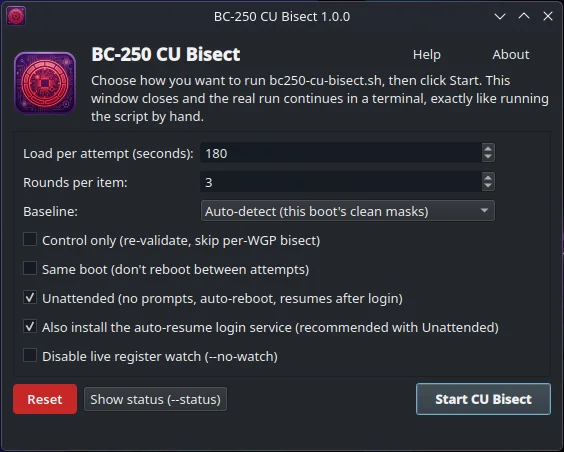
cu_bisect is an optional PyQt6 launcher for bc250-cu-bisect.sh itself - a menu-driven
"initial setup" screen for noob-friendly first runs. It doesn't run the bisect in-process: pick the
load time, rounds, a baseline variant, --control-only/--same-boot/--no-watch, and whether to run
--auto (unattended), then click Start CU Bisect. The window closes and hands off to a terminal
running the exact same command line you'd have typed by hand - no hidden behavior, nothing the script
itself doesn't already do.
Baseline is a simple preset picker rather than a free-form field by default: Auto-detect (this
boot's own clean masks, the safe default - no --baseline is passed), Stock 24 CUs
(0x07,0x07,0x07,0x07), Fully unlocked 40 CUs (0x1f,0x1f,0x1f,0x1f), or Custom... for any
other 4-mask value (validated live, same format --baseline takes).
Checking Unattended also offers to install the --auto resume-after-reboot systemd --user unit
for you (writing ~/.config/systemd/user/bc250-cu-bisect-auto.service and running
systemctl --user enable --now) - the same steps as the "Running truly unattended" checklist above,
just automated. Show status runs --status in a terminal without starting anything.
Run it straight from a clone (any distro):
cd bc250-bazzite-suite/apps/compute
python3 -m venv _python && _python/bin/pip install -r requirements.txt && _python/bin/python -m cu_bisect
On Bazzite, install.sh installs both windows (this one and the unlock GUI below) for your user: each gets a
private venv under ~/.local, a launcher, an app-menu entry, an icon and a Desktop icon. No rpm-ostree layering,
nothing outside your home directory. Run it as your own user, not with sudo:
./install.sh                         # both windows
./install.sh --bisect-only           # only the bisect window (--unlock-only: only the unlock window)
./install.sh --no-desktop-shortcut   # app-menu entries only, no Desktop icons
bc250-bisect-gui                     # or launch it from the app menu
./install.sh --uninstall             # removes the apps again (not any results or settings)
./install.sh --uninstall --purge     # also removes the results, settings, logs and autostart entries
install.sh runs packaging/bazzite/install-bisect-gui.sh and install-gui.sh, which also work on their own.
A terminal emulator is required to actually see/run the bisect (konsole, gnome-terminal, ptyxis,
xfce4-terminal, foot, alacritty, kitty, x-terminal-emulator or xterm - $TERMINAL is tried first);
the GUI shows an error if none is found.
BC Unlock GUI
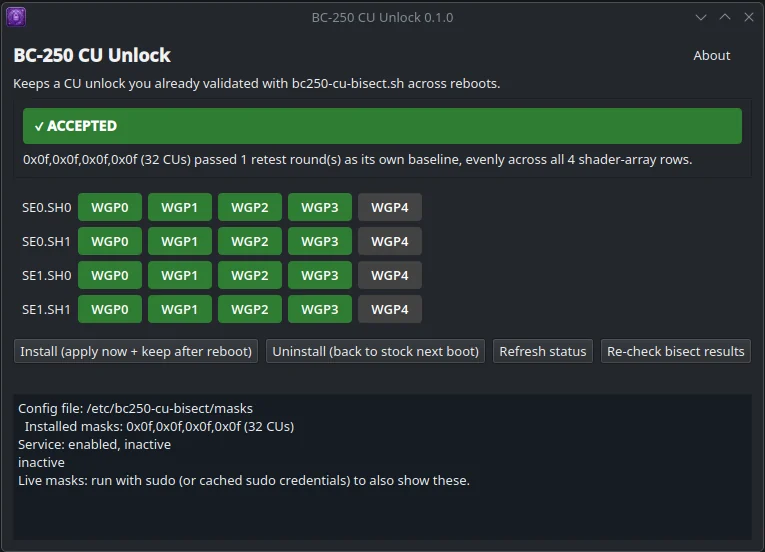
cu_unlock is an optional PyQt6 front-end for bc250-cu-unlock.sh. It doesn't take your word for
it: it reads bc250-cu-bisect.sh's own recorded results and only enables Install once they actually
show the combined mask was retested as its own baseline (no locked WGPs left in that run), every round
of that retest passed, and the 4 rows are even. It shows what's missing when they're not — e.g. "still
has 2 WGP(s) under individual test" or "did not pass every round" — and lets you re-check after you've
addressed that. The CU grid lights up green once a mask is accepted. Uninstall and Refresh status
don't depend on the gate; you can always disable the service. Like the command-line
bc250-cu-unlock.sh --install it wraps, clicking Install makes the unlock persistent: it's reapplied
on every boot by the same systemd service, without the GUI (or anything else) needing to run again.
Run it straight from a clone (any distro):
cd bc250-bazzite-suite/apps/compute
python3 -m venv _python && _python/bin/pip install -r requirements.txt && _python/bin/python -m cu_unlock
On Bazzite, ./install.sh (above) installs it together with the bisect window; ./install.sh --unlock-only
installs only this one. ./install.sh --uninstall removes the app again, not the unlock itself. Launch it from
the app menu or with bc250-unlock-cu-gui.
Install/Uninstall run bc250-cu-unlock.sh through sudo (masked password prompt, passed to sudo -S
only, never stored); nothing is installed with rpm-ostree for the GUI itself, a venv is enough.
An About button shows the app version and repository link, and the window remembers its size and position between runs.
Releases
Releases are tagged compute-v<x.y.z> in the suite repository and published on its
releases page as compute-v<x.y.z>.tar.gz
with a SHA256SUMS file. The tarball holds the whole toolset (bc250-cu-bisect.sh, bc250-cu-unlock.sh, both
GUIs, packaging/, images and docs). Download and extract it on the board instead of cloning the repository if you
just want to run the scripts or the GUIs; the portal installs it for you too.
Related
bc250-cores-bisect: sibling project, the same strategy for the 2 fused-off CPU cores — control, per-core bisect, verdict, then a reversible persistent 8C/16T unlock.
Bazzite Test: diagnostics for the BC-250 on Bazzite. Its test number 21 reads the live CU masks from the same registers (read-only).
License
GNU GPLv3, see LICENSE. This keeps the project (and any forks or redistributions of it) free and open source: anyone can use, study, and modify it, but a closed-source/proprietary fork isn't allowed — derivatives must stay under the same license and keep their source available too.