BC-250 GPU Governor Manager
PyQt6 front-end for cyan-skillfish-governor-smu, the GPU governor of an AMD BC-250 board (Cyan
Skillfish APU, gfx1013) running Bazzite (Fedora Atomic / rpm-ostree).
The governor itself must already be installed (COPR filippor/bazzite, see
filippor/cyan-skillfish-governor, smu branch).
sudo rpm-ostree install cyan-skillfish-governor-smu
systemctl reboot

# view configuration
sudo nano /etc/cyan-skillfish-governor-smu/config.toml
What it manages
- The
[gpu-usage]section of/etc/cyan-skillfish-governor-smu/config.toml:
| Key | Default | Meaning |
|---|---|---|
fix-metrics |
true |
Patch the GPU usage in gpu_metrics and bind-mount it over sysfs (fixes the 655% bug of MangoHud, the Steam overlay and radeontop) |
fix-freq |
false |
Also patch current_gfxclk_frequency with the real SMU clock (wrong sysfs frequency, mainly after the 8-core unlock) |
method |
busy-flag |
How the load is sampled: busy-flag, process or kernel (needs a patched kernel) |
temp-read |
drm |
Where the GPU temperature is read: DRM ioctl or hwmon sysfs |
flush-every |
10 |
Flush the patched table every N update cycles |
- The
[gpu]section:set-method(smu, default: clock and voltage through the SMU directly;kernel: through the amdgpu sysfs interface). - The
[frequency-range](min/maxMHz, 0 = no limit),[load-target](upper/lowerramp thresholds),[temperature](throttling, optionalthrottling_recovery) and[dbus](enabled) sections, with presets Shipped defaults, Quiet, Responsive and Maximum clock. - The control loop:
[timing.intervals](sample/adjustin µs),[timing.ramp-rates](normal/burstin MHz/ms),[timing](burst-samples, 0/Off = key left out;down-events) and[frequency-thresholds](adjust, the dead band in MHz). Validated like the governor does:adjust ≥ sample,burst > normal,burst-samples1–64.
Only known keys are written. Every other line of the file, including comments, stays as it is; missing keys
are appended to their section and missing sections are created. Before each write a copy
config.toml.bak-YYYYMMDD-HHMMSS is made next to it.
* The governor's D-Bus interface (com.cyanskillfish.Governor, system bus, via busctl): performance mode
on/off, a fixed frequency, a runtime min/max range, a runtime load target and temperature thresholds, plus the
current, initial and allowed ranges. Needs [dbus] enabled = true in the config (the shipped file has it). The root-only
TestMode interface (SetTestMode, via pkexec) pins a frequency and voltage so a safe point can be tried
under load before it goes into the file.
* cyan-skillfish-governor-smu.service: start, stop, restart, enable, disable, systemctl status and a live
journal tail with filter.
* Overview: service state, whether the patched gpu_metrics table is mounted, GPU load, clock, temperature,
socket power, a GPU load chart and the decoded gpu_metrics v2.x table (activities, temperatures, power,
clocks, throttle status, CPU core clocks).
The BC-250 usually exposes no gpu_busy_percent sensor, but the governor measures the load itself and, with
fix-metrics on, publishes it as average_gfx_activity in the patched gpu_metrics table it bind-mounts over
sysfs. The app reads the load from there (falling back to gpu_busy_percent, then radeontop if installed: rpm-ostree install radeontop).
When no source is usable it shows N/A, never a misleading 0%, and the tooltip says what to do about it
(install the governor, enable fix-metrics, start the service).
Privilege model
The app runs as your normal desktop user. Only four things need root and go through pkexec, one prompt
each: the backup plus write of config.toml (a single call), the systemctl actions, and the safe-point test
(busctl on the governor's root-only TestMode interface). The password is
handled by the desktop's polkit agent; the app never sees it.
Requirements
Python 3.11+
PyQt6>=6.11,<7
PyQt6-Charts>=6.11,<7
The PyQt6 wheels bundle Qt; nothing is layered with rpm-ostree.
Install on Bazzite
Install it from the BC250 Bazzite Suite portal. Or download gpu-v<version>.tar.gz from the suite's
releases, unpack it and run the installer:
tar -xzf gpu-v*.tar.gz
cd gpu-v*/
./install.sh
It installs the app for your user only, no root and no rpm-ostree layering: a private venv with PyQt6 and
the app under ~/.local/share/bc250-governor-manager, the launcher ~/.local/bin/bc250-governor-manager,
a desktop entry, the icon and a Desktop icon (./install.sh --no-desktop-shortcut leaves the Desktop icon
out). BC-250 GPU Governor Manager then appears in the application menu (and in
Steam's Game Mode via Add a Non-Steam Game if you want it there). Run ./install.sh again from a newer
release to update, ./install.sh --uninstall to remove it, ./install.sh --uninstall --purge to also remove its
settings, profiles and start-at-login entry. The governor's config.toml and its backups are never touched.
Run from the repository
git clone https://github.com/RobertoTorino/nexus.git
cd bc250-bazzite-suite/apps/gpu
python3 -m venv python && python/bin/pip install -r requirements.txt && python/bin/python -m gpu_governor
python -m gpu_governor --config PATH points the app at another config.toml, for development on a
machine without the governor. --start-in-tray starts hidden in the system tray (used by the login autostart
entry). --profile NAME applies a saved profile — in the already running instance when there is one (the app
runs once per user, over a local socket; a plain second launch raises the window), otherwise it starts and applies
— which makes it the command to bind to a desktop keyboard shortcut; Copy hotkey command on the Tuning page
puts the exact line on the clipboard. --list-profiles prints the saved names. --version prints the version.
The older tt governor
--backend tt manages cyan-skillfish-governor-tt instead (the tt branch of the same project: unit
cyan-skillfish-governor-tt.service, config /etc/cyan-skillfish-governor-tt/config.toml). The default
--backend auto picks whichever unit systemd has loaded, smu when neither is. The tt governor has no
[gpu-usage] fix, no [gpu] set-method, no [frequency-range], no timing.down-events, no D-Bus and no GitHub
releases, so the GPU Usage and Performance pages, those Tuning sections and fields, the gpu_metrics/performance
status and the update check are hidden; the GPU load sensor stays unavailable with it. Load target, temperature,
timing, frequency thresholds, safe points, backups and the service page work the same.
Pages
🔽 1 - Overview page
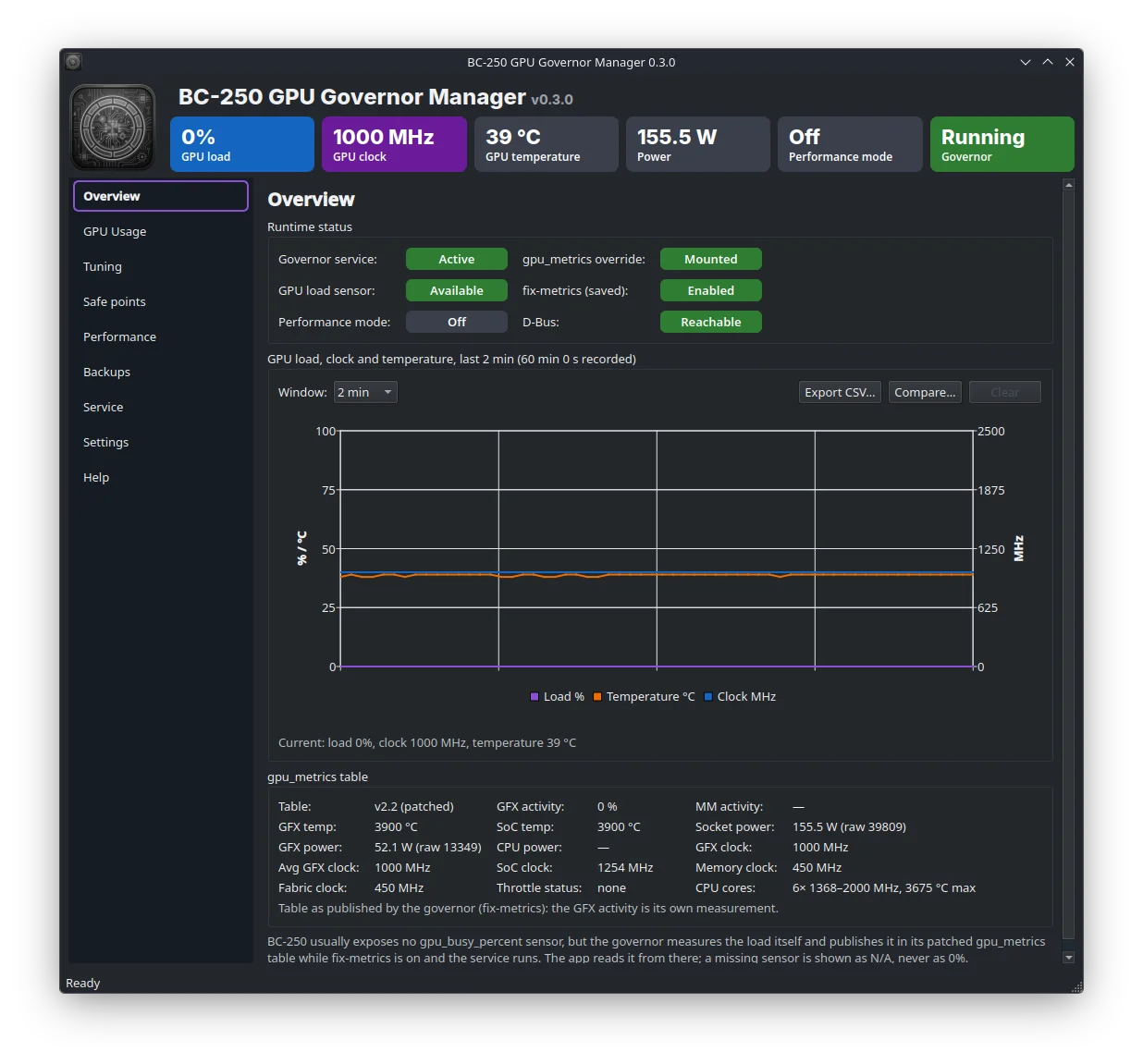
- Overview — runtime status pills, a chart of GPU load, temperature and clock with a 2/10/30/60-minute
window over the last hour of samples, Export CSV… for the whole history, Compare… to overlay an earlier
export dashed with both sessions' averages/peaks, and the
gpu_metricstable.
🔽 2 - CPU usage
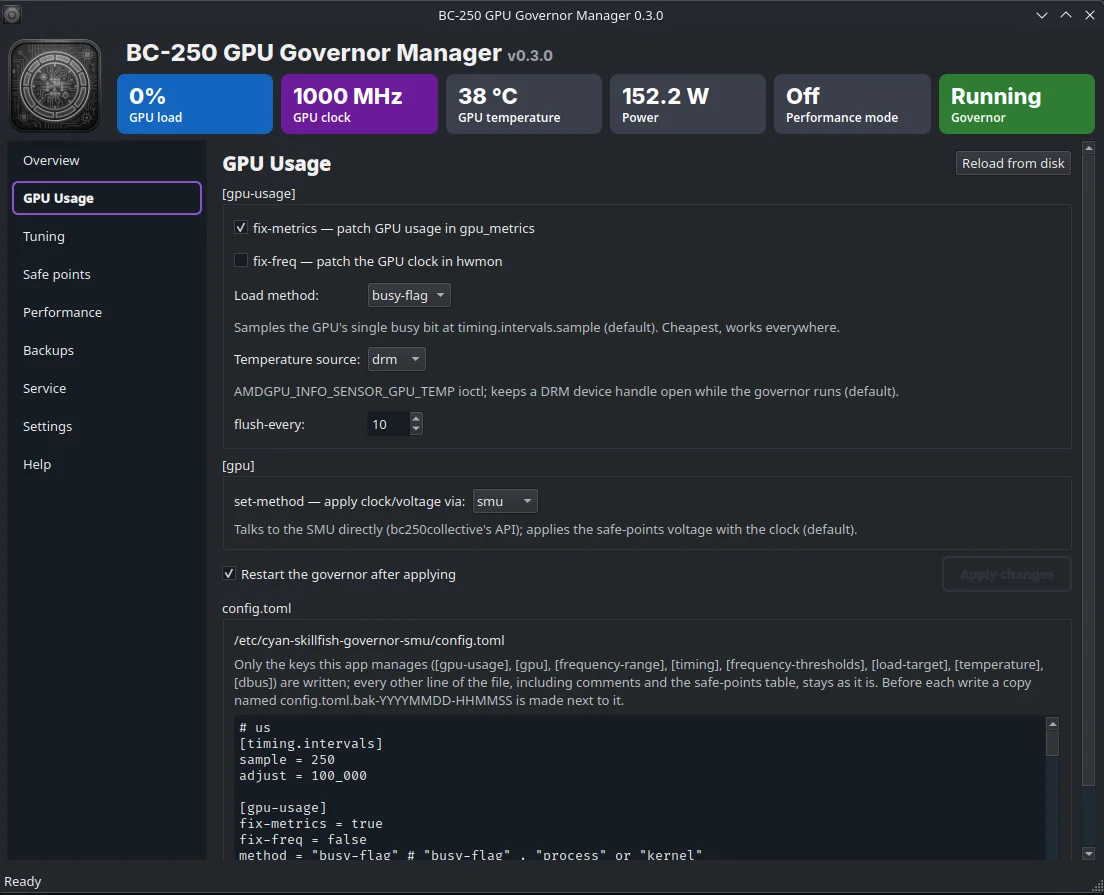
- 2 - GPU Usage — the
[gpu-usage]and[gpu]editor. Apply changes is enabled as soon as a value differs from the file; the window title gets a*. The governor reads the file at start only, so it is restarted after applying unless you untick that option. Reload from disk discards the edits. The raw file is shown below.
🔽 3 - Tuning
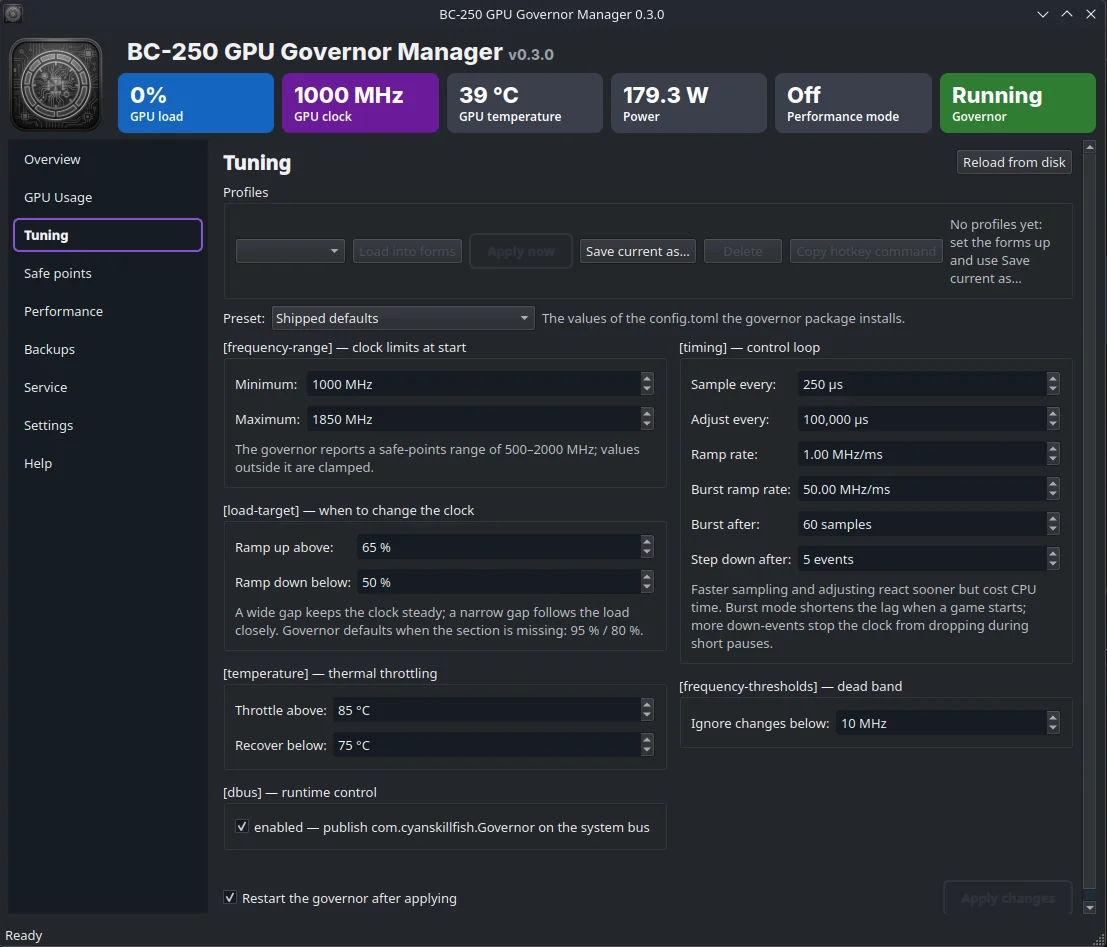
- 3 - Tuning — frequency range, load target, temperature and D-Bus sections with presets and validation on the
left; the
[timing]control loop (sample/adjust intervals, ramp rates, burst mode, down-events) and the[frequency-thresholds]dead band on the right. Apply on either config page writes the pending edits of both. Named profiles (snapshots of the Tuning and GPU Usage values, per user in~/.config/bc250-governor-manager/profiles.json) can be saved, loaded into the forms, applied directly or deleted; safe points are not part of a profile. Copy hotkey command gives the--profilecommand line to bind to a desktop shortcut.
🔽 4 - Safe points
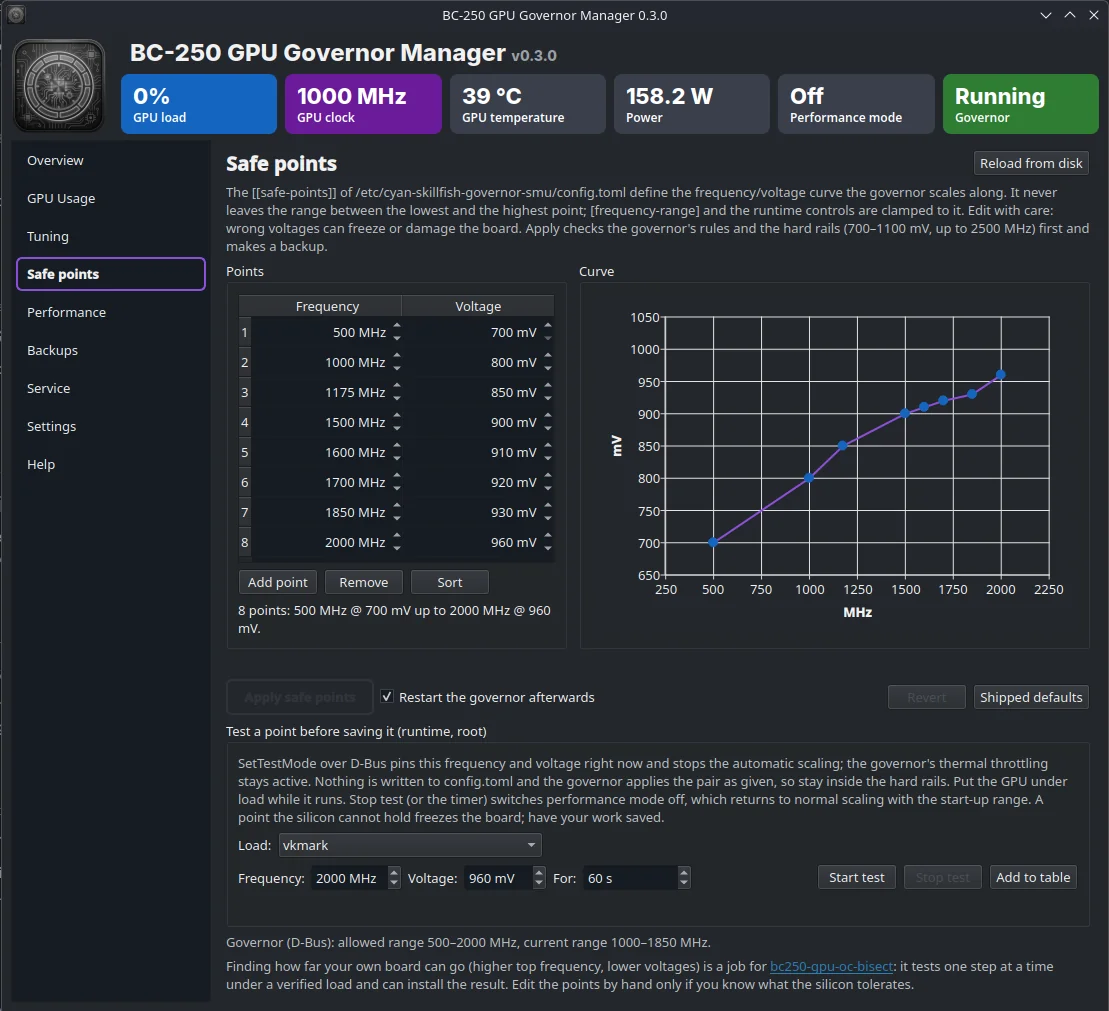
- 4 - Safe points — the
[[safe-points]]frequency/voltage curve as editable table and chart: add/remove points, shipped defaults, revert; Apply only after the governor's rules (unique frequencies, non-decreasing voltage) and the hard rails (700–1100 mV, ≤ 2500 MHz) pass, with warnings above 2000 MHz / 1000 mV. Backup + password. Test a point before saving it: pins frequency and voltage over the root-only TestMode D-Bus interface (pkexec, thermal throttling stays on, nothing written), prefilled from the selected row, with a timer (default 60 s), an optional load generator from PATH (vkmark / glmark2 / vkcube / glxgears) that runs for the test's duration and is reported if it dies, a kernel-log watch (journalctl -k -f) that aborts the test on the first amdgpu ring timeout / GPU reset /*ERROR*/ SMU failure and quotes it, a result line (held time, peak temperature, clock range, kernel verdict) and Add to table to turn a held point into a safe point; closing the app or any Performance-page action ends the test too.
🔽 5 - Performance
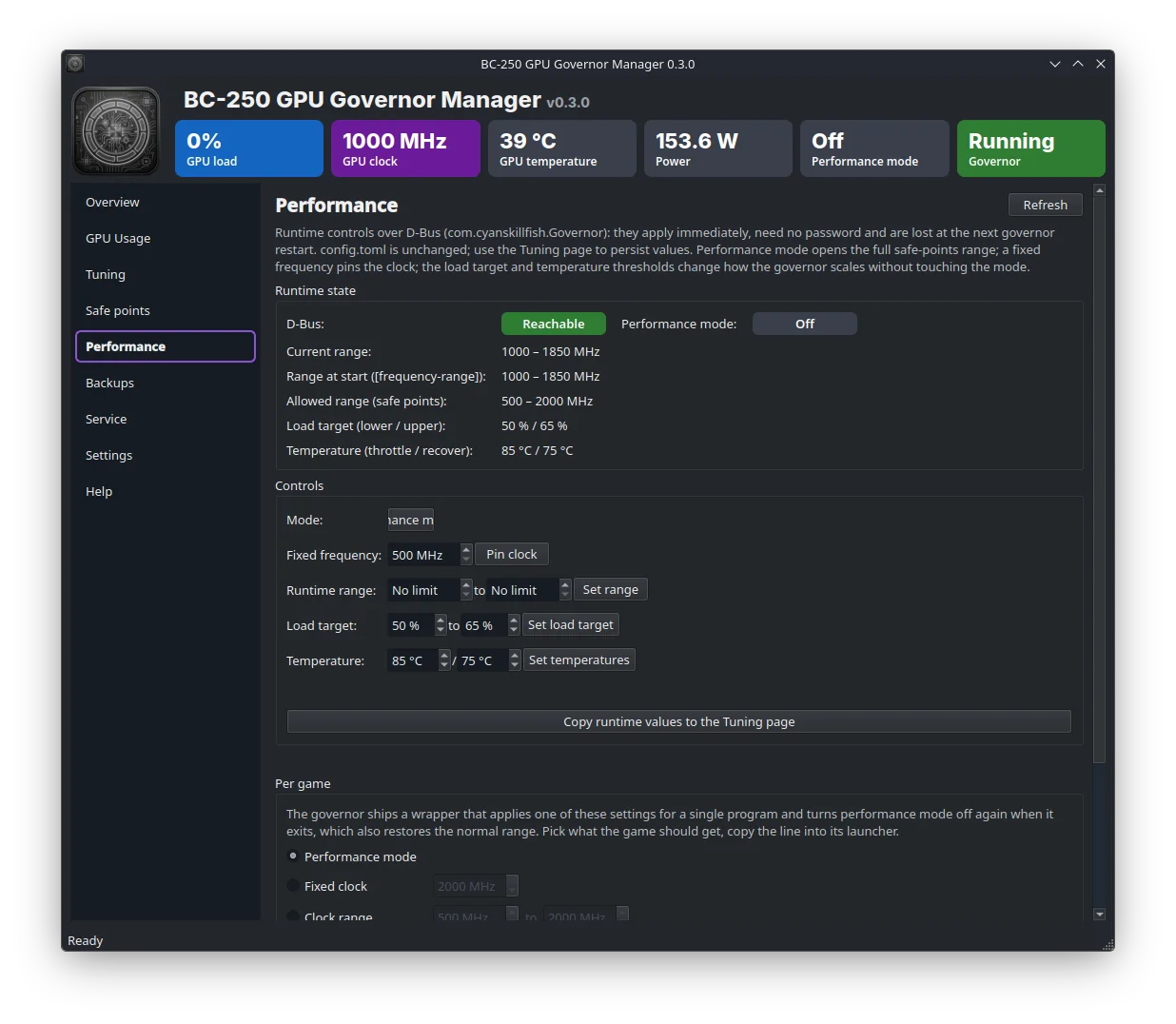
- 5 - erformance — runtime D-Bus controls (performance mode, pinned clock, runtime range, load target,
temperature thresholds), the live ranges and targets, a button to copy them to the Tuning page, and a Per game generator for the governor's
cyan-skillfish-performance-modewrapper (performance mode, fixed clock, range, load target, temperature; for Steam%command%, Heroic/Lutris or a terminal) with a Copy button. No password needed; runtime changes are lost at the next governor restart.
🔽 6 - Backups
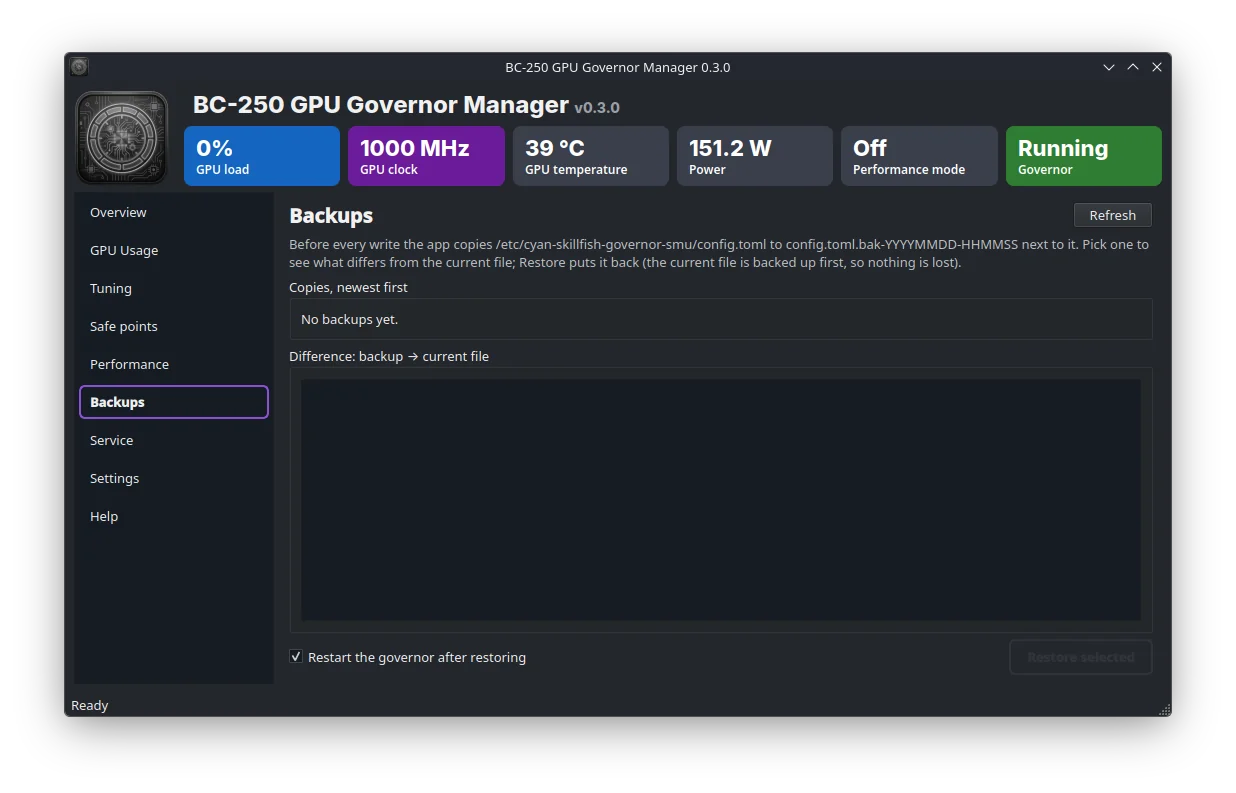
- 6 - Backups — the
config.toml.bak-*copies with a diff against the current file and one-click restore.
🔽 7 - Service
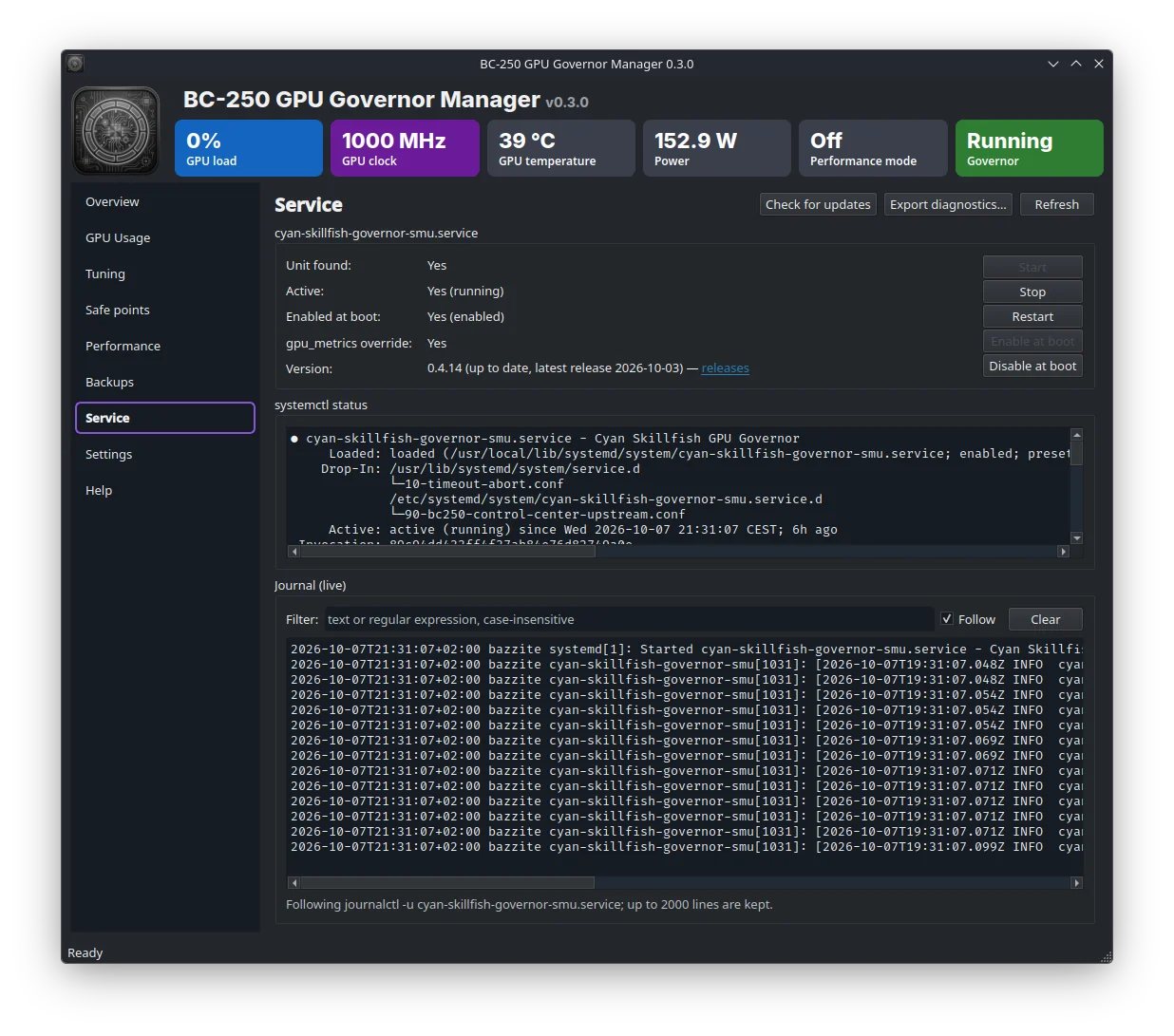
- 7 - Service — unit state, the five service buttons,
systemctl status, a live, filterable journal tail, and Export diagnostics…: one text file (versions, config, status, journal, rawgpu_metrics) for bug reports, and Check for updates: installed RPM versus the latest GitHub release of the governor (also at start, see Settings).
🔽 8 - Settings
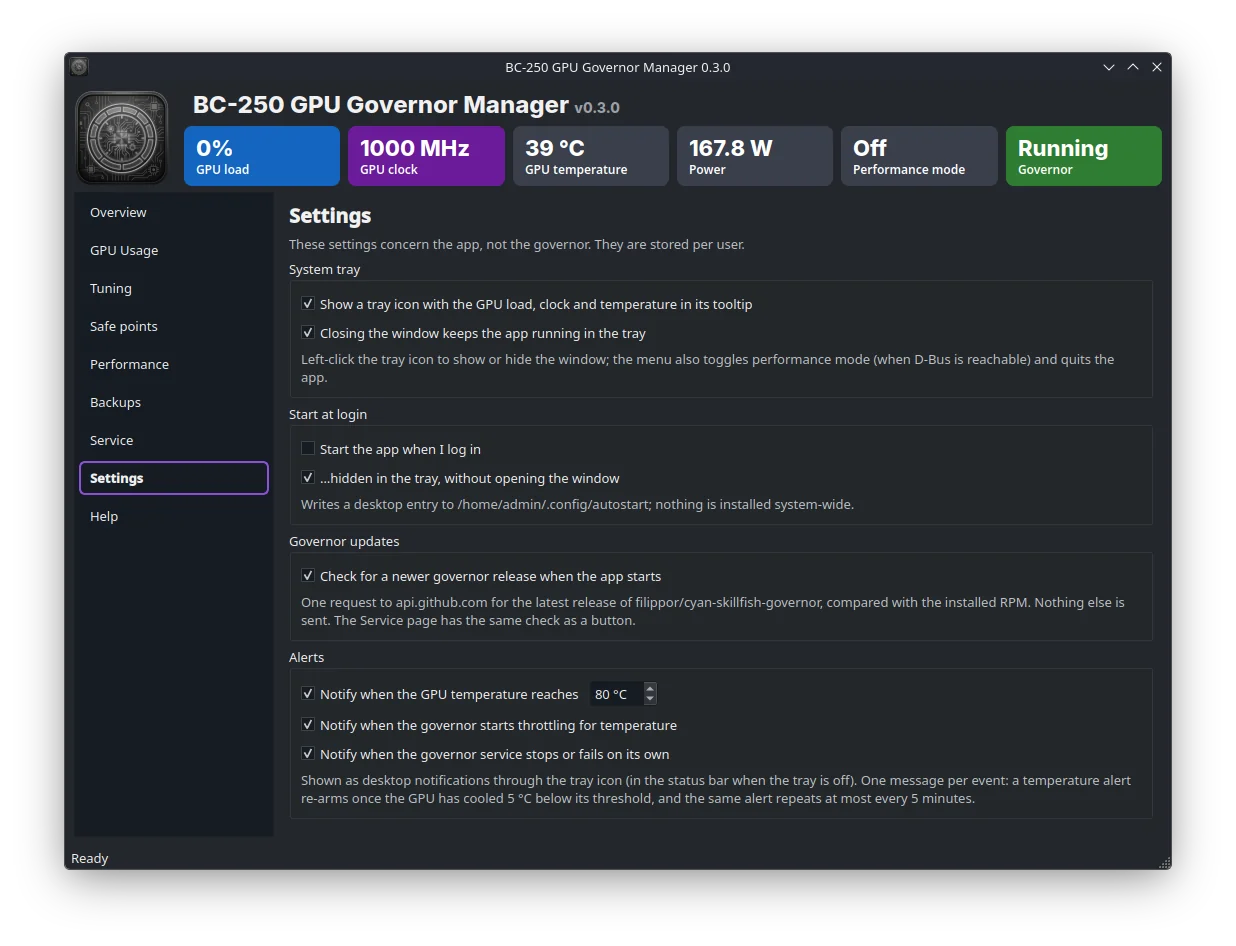
- 8 - Settings — app settings: system tray icon (load / clock / temperature in the tooltip, performance mode
toggle, Apply profile submenu, show/hide, quit), close-to-tray, a per-user login autostart entry in
~/.config/autostart, the governor update check at start, and alerts (desktop notifications when the GPU reaches a chosen temperature, when it reaches the governor's throttling temperature, and when the governor service stops or fails on its own; edge-triggered with hysteresis and a cooldown).
🔽 9 - Help
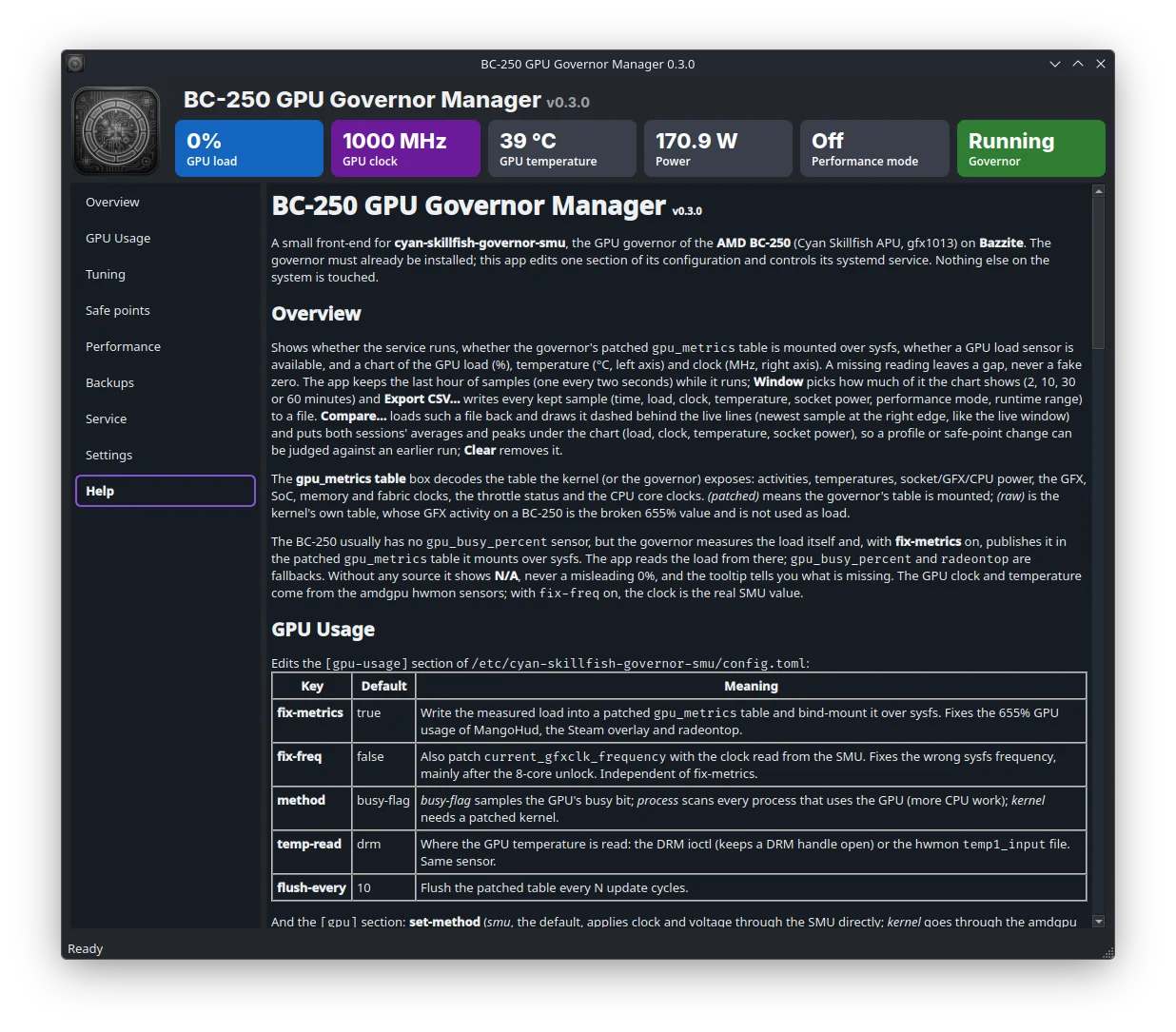
- 9 - Help — the same information inside the app, with links.
The window size and the last page are remembered.
Development
gpu_governor/
  __init__.py       app name, version, paths
  __main__.py       entry point (python -m gpu_governor)
  main_window.py    header, navigation, polling, pkexec and D-Bus actions
  pages.py          Overview and Service pages
  history.py        telemetry history ring buffer, CSV export/import and session summaries
  stress.py         load-generator detection and runner for safe-point tests
  kernelwatch.py    journalctl -k tail that aborts a safe-point test on amdgpu/SMU errors
  config_pages.py   GPU Usage and Tuning editors, presets
  performance_page.py  runtime D-Bus controls
  profiles.py       named profiles: JSON store and the Profiles box on the Tuning page
  instance.py       one instance per user: local socket that takes `show` / `profile NAME` requests
  safepoints_page.py   [[safe-points]] table and curve
  backups_page.py   backup list, diff, restore
  journal.py        live journalctl tail with filter
  diagnostics.py    diagnostics report for bug reports
  update_check.py   governor update check (rpm -q vs GitHub latest release, in a QThread)
  launch_options.py per-game launch option generator (Performance page)
  tray.py           system tray icon and autostart entry helpers
  settings_page.py  Settings page
  alerts.py         temperature / throttling / service alerts derived from the polled snapshot
  help.py           Help page
  widgets.py        status pills, metric boxes, terminal, rounded tooltip
  backends/
    base.py         GovernorConfig, ServiceStatus, GpuTelemetry, PerformanceState, backend protocol
    cyan_skillfish.py  schema-driven config.toml editing, systemd, sensors (smu governor)
    cyan_skillfish_tt.py  subclass for the older tt governor: fewer sections, no D-Bus
    gpu_metrics.py  gpu_metrics v2.1/v2.2 struct parser
    dbus.py         busctl client for com.cyanskillfish.Governor
    process.py      subprocess helper
  fonts/            Inter (SIL OFL), used for the header on Linux
install.sh          per-user installer (venv, launcher, desktop entry, icon); --uninstall [--purge] removes it
bc250-governor-manager.desktop  desktop entry template, Exec is filled in by install.sh
tests/              pytest suite (offscreen Qt; bus, systemd and pkexec mocked)
test.sh             runs it with the project venv
Tests: ./test.sh in the suite's root runs every test suite, this one included (extra arguments go to pytest,
e.g. ./test.sh -k profile). For this app alone: pip install -r requirements-dev.txt then
QT_QPA_PLATFORM=offscreen python -m pytest -q tests. They
cover the config.toml schema round-trip (both governors), safe-point parsing/rendering, the alert monitor, the
telemetry history and CSV export, profiles, the load-tool runner and the main window's TestMode, profile and
Performance-page state machines, all without a BC-250: D-Bus, systemd and pkexec are mocked.
The suite's CI (.github/workflows/ci.yml) runs them on every push and pull request. What the mocks cannot prove is
covered by the manual pass in bc250-bazzite/docs/HARDWARE-CHECKLIST.md, meant to be run on a BC-250 after each release.
Releases are tagged gpu-v<x.y.z> in the suite repository; .github/workflows/release.yml then builds the
tarball (it contains the installer) and publishes it on GitHub.
The backend is separate from the Qt UI so other governors (for example cyan-skillfish-governor-tt) can be
added behind the same protocol.
License
GPL-3.0-or-later, see LICENSE. The bundled Inter font is under the SIL Open Font License
(gpu_governor/fonts/Inter-LICENSE.txt).
Hardware verification checklist
Manual pass on a real BC-250 (Bazzite, cyan-skillfish-governor-smu.service running) for the features that the
pytest suite can only cover with mocks. Run it after a release, tick the boxes and open an issue for anything
that fails. Cross-check the GUI against busctl and the journal wherever a command is given.
Setup used:
- Release / tag:
v… - Governor version (
rpm -q cyan-skillfish-governor-smuor--version): - Kernel / Bazzite image:
- Date:
Useful shells to keep open:
journalctl -fu cyan-skillfish-governor-smu.service
watch -n1 busctl --system introspect com.cyanskillfish.Governor /com/cyanskillfish/Governor \
  com.cyanskillfish.Governor.PerformanceMode
1. Install
- [ ] Download
gpu-v<version>.tar.gzandSHA256SUMSfrom the suite's release;sha256sum --check --ignore-missing SHA256SUMSpasses (or install from the portal). - [ ]
./install.shfinishes without errors; the desktop entry, the icon and the Desktop icon appear. - [ ] Help page shows the released version number (not
0.x.0-dev/ the repository value). - [ ] Tarball contains no
tests/,.github/,requirements-dev.txt. - [ ]
./install.sh --uninstallremoves launcher, venv and desktop entry; reinstall afterwards.
2. Overview
- [ ] Telemetry (load, clock, temperature, power) matches
busctl … get-propertyvalues and updates each poll. - [ ] Chart window combo: 2 / 10 / 30 / 60 min; switching re-scales the time axis, the group-box title shows the recorded span and stops growing at 60 min.
- [ ] "Export CSV": file dialog proposes
bc250-telemetry-<date>.csv, file has a header row and one line per sample;perf_enabledandrange_min/maxcolumns reflect the Performance page state. - [ ] "Compare…" with that export: dashed lines appear right-aligned under the live ones, the note shows
"Reference
(…): load … clock … °C … W. Live window (…): …" and keeps updating; "Clear" removes it. A non-telemetry CSV is refused with a message. - [ ] Leave running > 1 h: memory stays flat (ring buffer), chart keeps scrolling.
3. Tuning / config.toml
- [ ] Apply a change (e.g.
frequency-rangeupper):/etc/…/config.tomlkeeps comments and untouched lines, only the edited value changes, the service restarts and the journal shows the new value. - [ ] Safe points stay at the end of the file; newly added sections (
[timing.*],[frequency-thresholds]) are appended after them with their header comment. - [ ] Backups page lists the new backup; restore brings the previous file back byte-for-byte.
- [ ] Invalid input (upper < lower, unknown method) is refused before anything is written.
4. Profiles
- [ ] "Save current as…" with a name containing spaces/slashes → sanitized name stored in
~/.config/bc250-governor-manager/profiles.json. - [ ] "Load into forms" marks the page dirty (Apply enabled) without touching the file.
- [ ] "Apply now" writes the file and restarts the service; tray "Apply profile" submenu lists the same names and applying from the tray shows a notification when the window is hidden.
- [ ] Delete removes it from both the combo and the tray submenu.
- [ ] "Copy hotkey command" → paste into a terminal while the app runs: the running instance applies the profile (pkexec prompt, tray notice), the terminal prints "handed to the running …" and exits at once; a wrong name gives a tray warning, no dialog. Bound to a key in System Settings → Shortcuts it does the same.
- [ ] Launching the app a second time (menu or terminal) raises the existing window instead of a second tray
icon;
--profilewith the app not running starts it and applies. - [ ] Switching between a smu and a tt profile (if both installed) does not write unsupported keys.
5. Performance page
- [ ] Enable/disable performance mode:
Enabledproperty flips, fixed frequency / range are honored by the clock trace on the Overview. - [ ] "Set load target":
busctl … get-property … LoadTarget*shows the new pair; forms do not reset while editing but refill when the governor reports different values. - [ ] "Set temperatures": throttle / recovery pair accepted; 0 shows as "Not set"; invalid pairs disable the button with the hint.
- [ ] While a safe-point test is running, load / temperature changes do not end the test (status stays "Testing…"); Enable, Set fixed frequency and Set range do end it.
6. Safe-point test (TestMode)
- [ ] "Test a point" asks for pkexec once, pins the frequency/voltage;
busctl … TestModereports it; Overview clock trace sits at the pinned value. - [ ] Timer expiry, Stop, closing the window and the governor going away each release the point and stop the
load tool (check
pgrep vkmark|glmark2|vkcube|glxgearsis empty). - [ ] Load combo lists only tools present on PATH; "(none)" works without starting anything.
- [ ] Run with
vkmarkorglmark2: GPU load rises on the Overview, temperature climbs, result line shows held time, tool name, peak °C and clock range. - [ ] Kill the load tool by hand mid-test: live status and verdict mark the tool as exited/crashed, the test itself keeps running until Stop/timer.
- [ ] Live status says "Kernel log watched" (user in
systemd-journal/wheel); as a user outside those groups it says "Kernel log not readable, no hang detection" and the verdict says "kernel log not watched". - [ ] Clean run: verdict ends with "no GPU errors in the kernel log".
- [ ] Hang detection: with a test pinned,
sudo sh -c 'echo "<3>amdgpu: ring gfx_0.0.0 timeout (checklist)" > /dev/kmsg'aborts the test within a second, the verdict quotes the line, tray shows a warning icon,busctlshowsEnabledfalse. - [ ] "Add to table" inserts the tested pair sorted; testing the same frequency again replaces the row.
- [ ] Deliberately unsafe point (voltage too low): governor/GPU recovers, GUI reports governor gone or verdict, no stuck pkexec prompts. Have a reboot plan ready.
7. Alerts
- [ ] Settings → Alerts: set temperature threshold a few degrees below the current reading → one tray notification + status-bar line; no repeat until the temperature drops ≥ 5 °C and climbs back, or 5 min pass.
- [ ] Throttle alert fires when the reading crosses the governor's throttle temperature (Performance page value,
else
temperaturein config.toml). - [ ]
sudo systemctl stop cyan-skillfish-governor-smu.serviceafter the app has polled it running → "service stopped" alert;startagain, no false alert on launch when the service is already stopped. - [ ] Disabling each alert in Settings silences only that kind.
8. Tray / lifecycle
- [ ] Close to tray, restore, quit from tray: no "QProcess destroyed while running" in the terminal, load tool and TestMode released.
- [ ] Launch options (autostart, start minimized) behave as labeled.
- [ ] Update check reports the running version as current right after a release.
Result
- [ ] All boxes ticked for release
v…on<date>. - Issues opened: …